


Table of Contents
Have you ever poured $2,000+ into ads that produced zero clients? We've been there.
The legal ad world is competitive. Google Ads for lawyers can cost anywhere from single digits to over $100 per click, depending on practice area and market.
The opportunity is real if you dial in your targeting and tracking, but the specific return depends on your funnel. There’s no fixed multiplier.
So how do you compete without wasting your ad spend? This guide walks your law firm through: (1) What Google Ads cost for lawyers, (2) How to set up a campaign that tracks the right conversions, (3) How to judge performance by retained clients. Let’s dive in.
Key Takeaways
- A click, a lead, and a client are three different things. Search ads bill per click; Local Services Ads bill per lead. The number that matters is your cost per retained client.
- Industry averages: $9.87 CPC, $131.63 cost per lead, 5.55% conversion rate. Useful as a sanity check against your own numbers. Don’t aim for this.
- Google can spend up to 30.4× your daily budget in a month. Plan around the higher ceiling or your monthly bill will surprise you.
- Set your acceptable acquisition cost before you touch the platform. If a case is worth $6,000 after costs and you'll spend a quarter of that to acquire one, $1,500 is your ceiling.
- Distinguish a raw inquiry from a qualified lead when tracking. A campaign with a low cost per lead can still be a bad campaign if those leads are a bad fit or don’t sign.
- This guide follows a 12-step sequence for a reason. Define your goal and acceptable cost first, set up tracking before you launch, then build out keywords, targeting, ad copy, and assets.
Don’t Risk Another Dollar Guessing
Our ad experts have been doing this for 18 years. We connect your ad spend to real business outcomes like qualified leads and cases.
Start Your Ads

How Do Google Ads Work for Law Firms?
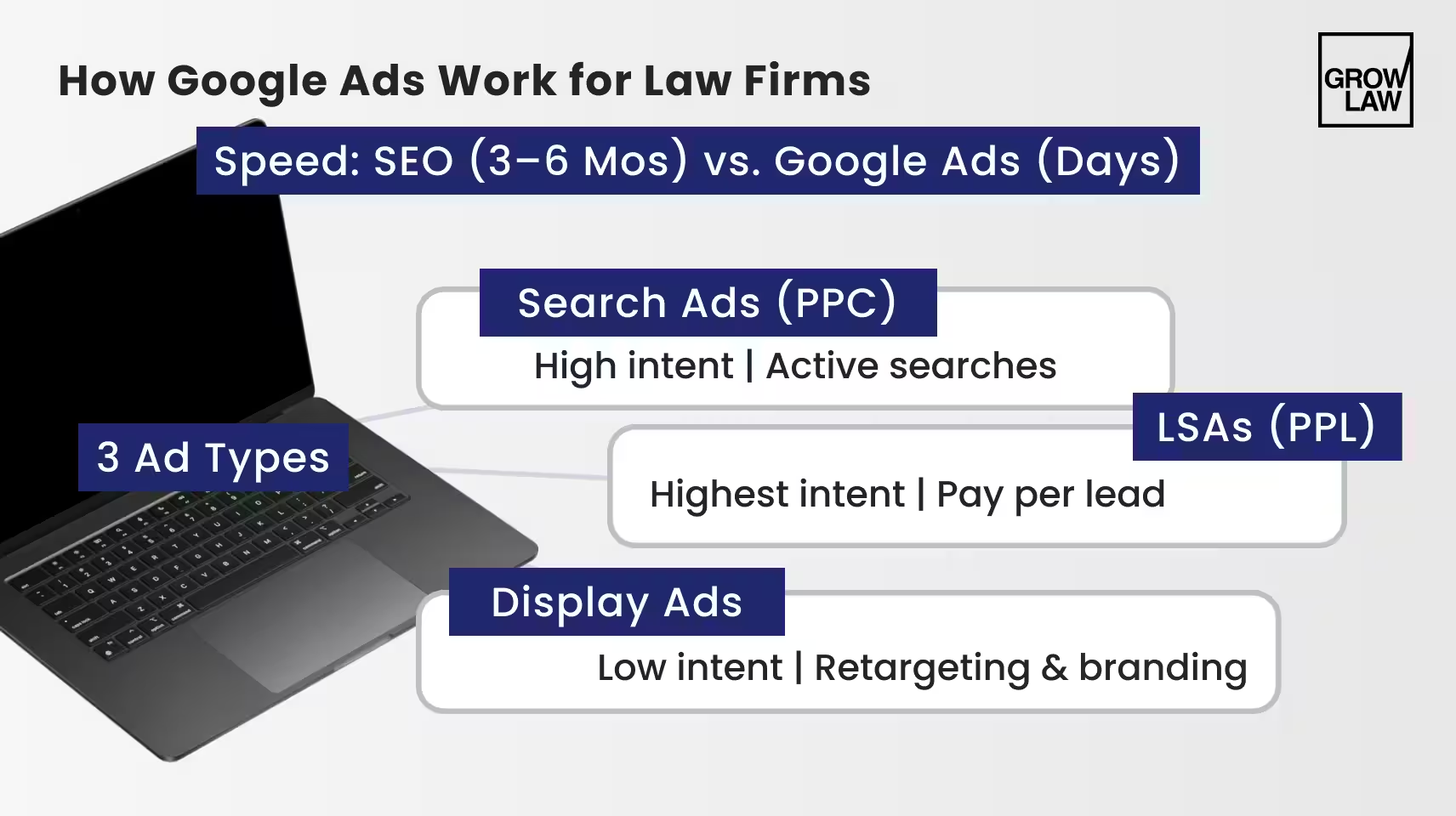
SEO (search engine optimization) takes 3 to 6 months to get leads. Google Ads can start driving traffic much faster, often within days, once your campaign is live and approved.
— Where Your Ads Appear
Your law firm ad appears at the top of Google search results when people look for the exact legal help you offer. That could be "divorce lawyer in Chicago," "personal injury attorney near me," etc.
— How You're Charged
It runs on a pay-per-click (PPC) model, meaning you pay for every ad click. Each click may or may not bring a potential client to your website.
For law firms, Google Ads captures people at the precise moment they're ready to call, book a consultation, or start working on their case.
— What You Can Target and Create
One of the best features of law firm Google Ads is keyword targeting. You can target specific keywords that are relevant to your law firm or legal services (such as "car accident lawyer Chicago," or "uncontested divorce attorney near me”).
Google Ads for attorneys also allows you to create text, image, and video ads that include a clear call-to-action (CTA), encouraging users to click through to your website or contact your law firm.
— Search vs. Local Services Ads vs. Display
Do all Google Ad placements work the same way? Not at all.
Search Ads are the standard PPC campaigns this guide focuses on: you bid on keywords, and you're charged per click regardless of whether that click turns into a case. For paid placements inside AI conversations, compare this model with ChatGPT advertising management.
Local Services Ads (LSAs) are a separate, invite-only product for eligible service areas: instead of paying per click, you pay per lead, and eligibility depends on passing Google's screening and background check for your market.
Display Ads show up as banner-style placements across other websites. They're generally better suited to remarketing and brand awareness than capturing people actively looking for a lawyer.
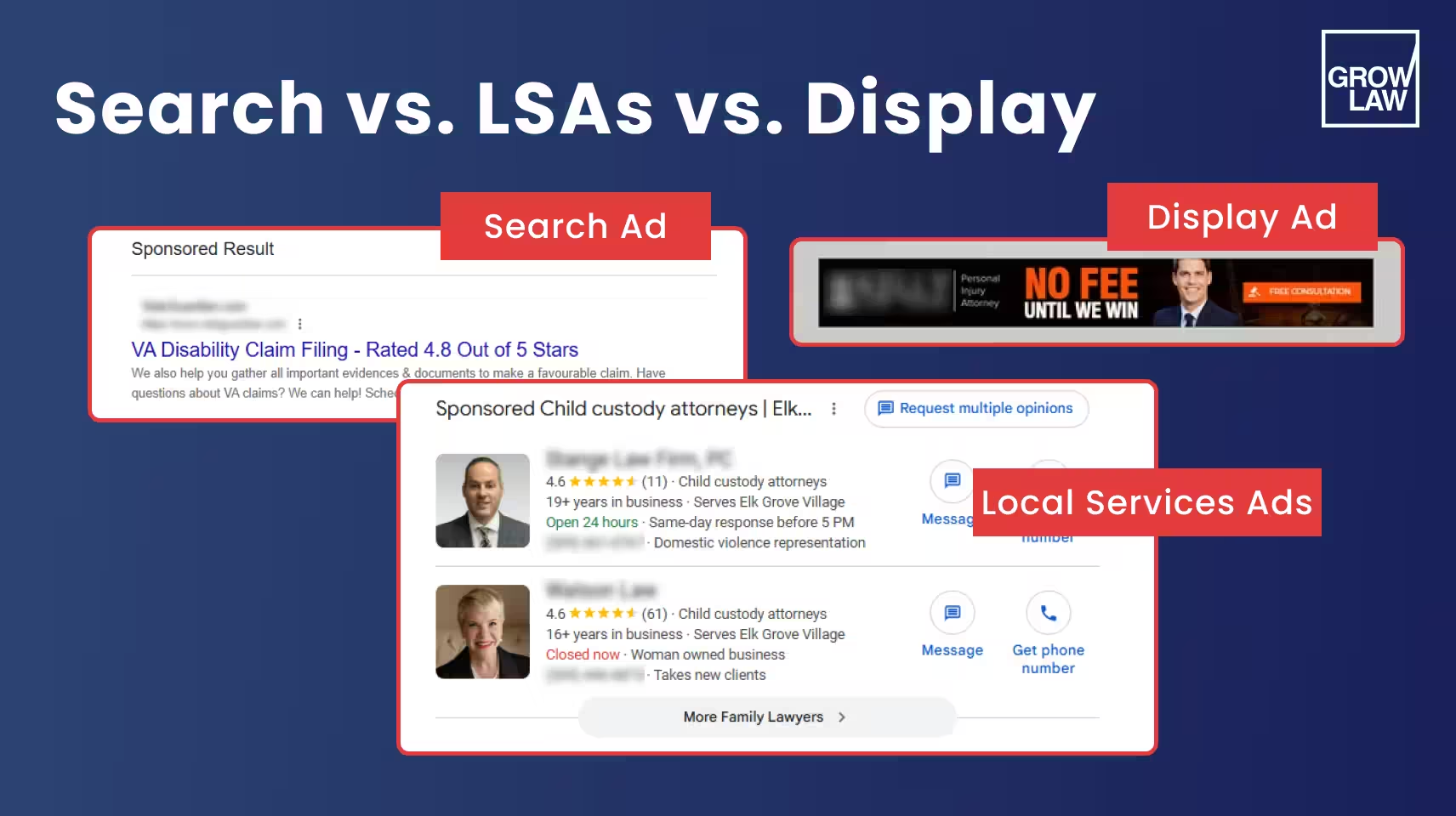
This guide focuses on Search Ads, since that's where most law firm ad budgets and the highest-intent (ready-to-hire) traffic go.
This section gave you the basics of how do Google Ads work for lawyers. In the next section, we’ll cover what’s probably at the top of your mind: costs.
Are Google Ads Worth It for Lawyers? Costs and Budget Planning
Yes, Google Ads for attorneys can be expensive, but they offer a real opportunity to reach potential clients who are searching for legal help.
But are Google Ads worth it for lawyers, specifically you? Well, that depends on your budget, your target audience, your practice area's competition, and how well your funnel converts clicks into retained clients. Insurance attorney digital marketing requires this same practice-specific budgeting and funnel discipline.
There's no single answer that applies to every firm.
— What Legal Clicks Cost
For context, here's how the legal industry compares on Google Search, based on a 2026 benchmark study covering more than 13,000 Google and Microsoft Ads search campaigns in the Attorneys & Legal Services category (April 2025 to March 2026):
- Click-through rate: 5.87%
- Average cost per click: $9.87
- Conversion rate: 5.55%
- Cost per lead: $131.63
Source: WordStream / LocaliQ, 2026 Google Ads benchmarks
This should give you a fairly good benchmark of what Google Ads cost for lawyers.
Reminder: These are sector-wide averages. Not a forecast for your firm. Not a target to hit. Your actual CPC and conversion rate will vary by practice area, market, and how tightly your keywords, ads, and landing pages align with each other.
— Getting Retained Clients
A click is not a client. To judge whether your Google Ads for lawyers spend is worth it, you need to follow the funnel from spend down to signed cases:
- Clicks = media spend ÷ CPC
- Inquiries = clicks × click-to-inquiry rate
- Qualified leads = inquiries × inquiry-to-qualified-lead rate
- Signed clients = qualified leads × qualified-lead-to-signed-client rate
Each rate in this funnel is specific to your firm and should be measured. Define what counts as an "inquiry" (a form fill, a call of a minimum length) and what counts as "qualified" (meets your practice area, geography, and case criteria) before you start tracking.
That way, every stage measures the same thing over time. This funnel describes new-client acquisition.
Don't have the data yet? You can use these formulas with estimated inputs to forecast a budget.
Once your campaigns are live, replace those estimates with your own observed rates; treat the two separately so you know whether you're planning or measuring.
— Media Cost vs. Total Acquisition Cost
Your Google Ads for attorneys spend is only part of what it costs to acquire a client:
- Media CAC = ad spend ÷ signed clients
- Total marketing CAC = ad spend + management fees and other relevant marketing costs, divided by signed clients
Beware: Media CAC alone can make a campaign look cheaper than it actually is. Total CAC gives you the real number to weigh against what a signed case is worth to your firm.
— Daily Budgets vs. Monthly Spend
Google Ads typically run on an average daily budget.
According to Google, for campaigns left unchanged for a full calendar month, Google can spend up to 2 times your average daily budget on any given day, and your total monthly spend can reach up to 30.4 times your average daily budget.
We suggest planning your monthly budget around that ceiling, instead of around your daily figure multiplied by the number of days in the month.
Remember, there's no universal minimum budget that works for every firm. The right number comes from working backward through the funnel above (from the number of signed clients you want to your required ad spend) given your market's CPC and your firm's conversion rates at each stage.
Want to get the most out of your Google Ads? The tips in this guide will help. Many firms also work with an experienced legal marketing agency to navigate campaign setup, tracking, and ongoing optimization.
How to Run Google Ads for Lawyers: 12 Practical Steps
Anyone can run a campaign. But we’ll give you the best practices for how Google Ads work for lawyers to run a successful campaign.
The tricky part is setting it up so it produces retained clients. That takes a deliberate sequence. Pulling from 18+ years of Google Ads expertise, we’ve broken down how to run Google Ads for lawyers into 12 practical steps:
1. Define the service, offer, and retained-client goal
Before opening Google Ads, decide what your campaign needs to produce: which practice area, which service, and what "success" looks like (a signed, retained client, not just a “lead”). Our tax attorney marketing services show how paid search works alongside SEO, content, and referral channels.
This may sound obvious, but match the scope to what your firm can take on.
If your campaign drives 50 calls a day, but your intake team can realistically follow up with 15 of those the same day, the other 35 either go stale, get a delayed callback, or never convert. And you paid for every one of those clicks.
Additionally, settle on what you can afford to pay to acquire one signed client.
For example, if a signed case is worth $6,000 to your firm after costs, and you're only willing to spend a quarter of that on acquisition, your acceptable cost per signed client is $1,500.
That number (not your cost per click), is what every budget and bidding decision in this guide should ultimately be measured against.
2. Set up conversion and intake tracking
Do this before you launch. If tracking goes live after your campaign does, you lose the data from every click and call in between. At minimum, track:
- Calls, with a minimum call-length threshold so hang-ups and wrong numbers don't count as leads
- Form submissions, from your intake or contact forms
- Duplicate controls, so one caller who calls twice or fills out a form after already calling isn't logged as two separate conversions
- A qualified stage, separate from a raw inquiry, marking whether the person fits your practice area, geography, and case criteria
- A retained-client stage, marking whether a qualified lead became a signed case
Raw inquiries and qualified leads are not the same thing. A campaign that produces cheap, plentiful inquiries but few qualified ones isn't actually cheap once you look at cost per qualified lead.
If part of your intake happens offline, for example, a call that turns into a signed client days or weeks later, Google Ads supports importing those outcomes back into the platform, under applicable consent and data rules.
That keeps your bidding data tied to real case value instead of stopping at the form fill or phone call. Honestly, this is one of the best Google Ads tips for lawyers we could give you.
3. Research high-intent keywords and negatives
With tracking in place, you're ready to decide what to bid on.
Start with a base keyword for your practice area, like "estate planning lawyer" or "criminal defense attorney," and build outward.
A free tool like Google Ads Keyword Planner (or paid tools like Ahrefs, SEMrush, or Moz Keyword Explorer) can show you search volume, competition, and estimated cost per click for any variant.
But pay attention to location and specificity. A criminal defense practice in Springfield, IL might get more qualified traffic from "criminal defense attorney in Central Illinois" than from the broader "criminal defense lawyers.”
Remember, not every keyword carries the same intention. Separate:
- Informational searches — researching a topic, not ready to hire
- Commercial searches — comparison-minded terms like "best divorce lawyer in Miami"
- Transactional searches — actively looking to hire now, often signaled by terms like "consultation" or "free consultation"
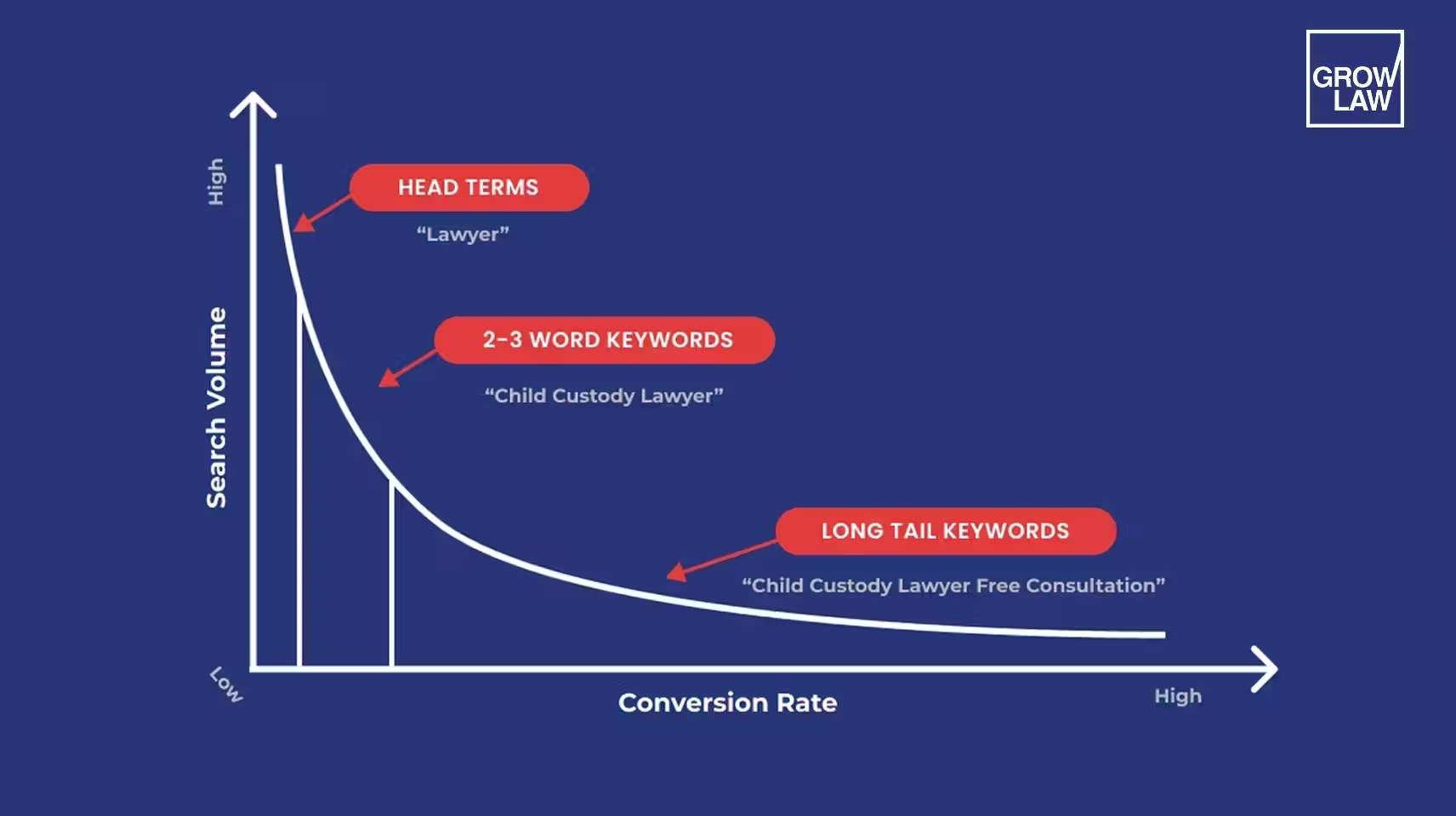
Long-tail keywords (3-4+ words) tend to bring better-qualified traffic. "Attorney" on its own is vague; "immigration attorney free consultation" costs more per click but attracts a prospect much closer to hiring.
Match types determine which searches can trigger your ad:
- Broad match — the widest net: triggers on related searches, synonyms, and variations. A keyword like "criminal attorney" might also trigger on "defense attorney."
- Phrase match — triggers on searches that include your keyword's core meaning, allowing variation in word order, plurals, and close synonyms.
- Exact match — the narrowest: triggers on searches with the same meaning or intent as your keyword, including close variants Google identifies, but not unrelated phrasing.
- Negative keywords — phrases that block your ad from showing. A defense attorney who doesn't handle traffic cases might add "traffic," "DUI," or "speeding" as negatives.
Be careful with negative keywords that seem obvious but aren't.
"Free" is a common blanket exclusion for firms worried about attracting non-paying searchers, but if your firm offers a free consultation, excluding "free" cuts off exactly the searchers that phrase is meant to attract.
Build your negative list from what's triggering your ads. This is one of the most important Google Ads tips for lawyers.
4. Organize related services and intents
Have your Google Ads keywords for lawyers list? Great. Now, we group them by how materially different the underlying offer is.
If you’re a personal injury firm, you might separate “car accident cases” from “slip-and-fall cases” into their own ad groups. Why? Because each has different search language, different urgency signals, and needs a landing page written specifically for that case type.
That specificity is what keeps your ad copy and landing pages relevant to the Google Ads for lawyers search.
P.S. This is what improves your Quality Score (Google's rating of how relevant your ad and landing page are to the search). A better Quality Score can lower your cost per click and improve your ad's position.
Pro Tip: You don't need a separate ad group for every single keyword. Single Keyword Ad Groups (SKAGs), where one keyword gets its own dedicated ad group, can be worth testing for a keyword that's already proven itself a strong performer.
Avoid the opposite problem when approaching how to run Google Ads for lawyers: stuffing the same keyword repeatedly into your ad copy. Google's systems are built to detect that pattern.
5. Choose serviceable locations and languages
Lawyers can only practice where they're licensed. Your targeting needs to match that reality.
A personal injury lawyer in Los Angeles should target people searching for legal help in and around LA, instead of the entire state of California.
Google gives you two ways to define that reach:
| Targeting option | Who it reaches | Best for |
|---|---|---|
| Presence | People who are regularly in your area, whether they live there or are just often nearby | Most law firms, since it keeps ads pointed at people who could realistically become local clients |
| Presence or interest | People who are regularly in your area, plus people elsewhere who've shown interest in it, like searching "Los Angeles personal injury lawyer" from another state | Firms specifically trying to reach people planning to relocate or already involved in a case tied to that location |
For most firms, Presence (option #1) is the default.
You can also set a radius around your office (say, 25 miles), and use exclusions.
Don’t serve a particular county? Your intake team can't take cases from a certain area? Exclude it. There's no upside to paying for clicks from people you can't help.
Factor in language, too. If you run ads in Spanish, your landing page needs to be in Spanish, and your intake team needs to speak Spanish.
Google Ads for lawyers that promise Spanish-language service and then route to an English-only intake team waste the click and frustrate the caller. Factor this into your immigration PPC campaign strategy specifically.
Important note: In September 2026, Google announced a change how it matches language for Search ads.
Previously, many advertisers set language at the campaign level. Google has announced it's moving toward matching based on the language the ad itself is written in.
This is a rollout, not a switch that flips everywhere at once. Check your account settings rather than assuming the change has already applied to your campaigns.

2026 edition
How to Get More Clients for a Law Firm

Download Checklist
6. Choose Search inventory, budget and bidding
Next, make sure your Search campaign is running in Search-only mode.
Google Ads used to auto-include Search campaigns in the Display Network (banner-style ads on other websites).
But as of 2025, that's no longer checked by default. There's still a checkbox for it in your campaign settings. Leave this unchecked or part of your budget goes toward Display impressions instead of the high-intent searches you're bidding on.
Display isn't a bad channel, but give it its own campaign and its own creative later, don't let it piggyback on your Search budget.
For your budget, use the average daily budget approach from earlier. Set your daily average, then plan your month around the fact that Google can spend up to roughly 30.4 times that number over a full month.
Now, bidding. You've got a few strategies to pick from:
- Manual or standard CPC. You pay per click, and you set or guide the bid yourself. Straightforward, but you're doing the optimization work.
- Target CPA. Google adjusts your bids automatically to hit an average cost-per-conversion goal you set. This is a bidding strategy, not a different way of paying. You're still charged per click, not just when someone converts. And it only works if you've already got solid conversion tracking in place (see step 2). Without that, it has nothing reliable to optimize toward.
- Target ROAS. Similar idea, but built around a target return on ad spend instead of a flat cost-per-conversion number.
One thing to skip: CPM bidding. It's built for visibility and brand awareness, not for a Search campaign trying to generate calls and form fills. Keep it out of this setup entirely.
7. Write responsive search ads
Remember the fixed-format ads Google ran a few years ago? Today's Google Ads run on responsive search ads.
Instead of writing one headline and one description, you give Google a pool of components, and it tests combinations to see what performs best.
Component Limits
| Component | How many | Character limit |
|---|---|---|
| Headlines | 3 to 15 | 30 characters each |
| Descriptions | 2 to 4 | 90 characters each |
| Display paths (optional) | up to 2 | 15 characters each |
Because Google mixes and matches these pieces, do not write your headlines as a sequence that only makes sense in order.
Google can show any headline with any description, so a script like "Injured in a Car Accident?" → "We Can Help" → "Call Today" breaks if it shows headline 2 and 3 without 1. Write each headline to stand alone.
Keep Claims Truthful and Specific
"Free consultation" only belongs in your copy if you offer one.
Vague superlatives like "best lawyer in the city" invite scrutiny you don't need.
ABA Model Rule 7.1 bars communications that compare your services to other lawyers' without factual support. Several state bars have specifically found "best" or "super lawyer" claims to be problematic.
Also, keep your ads specific. Match each ad's language to the intent behind its ad group. An ad group built around “car accident” searches should read differently than one built around “slip-and-fall” searches, using the right language and urgency signals.
Dynamic Keyword Insertion (Optional)
DKI automatically inserts the exact keyword someone searched into your ad copy. If your target keyword is "car accident lawyer in New York," a DKI-enabled headline might render as: "Car Accident Lawyer in New York — Call Today."
Review it carefully before turning it on. If the inserted term doesn't fit your sentence structure (or reflects a claim you can't back up) it can read oddly or promise something you didn't intend.
Check the Competition, Then Match Your Landing Page
Ready to finalize your ads? Pause. Look up your target keyword and see what's currently showing at the top of results, on both mobile and desktop.
That's not about copying a competitor, but outdoing them. Say a competing firm’s ad says "Call Now, Free Consultation.” You can say, "Free Consultation, Available 24/7 | Weekends.”
Whatever you write, make sure it matches the landing page it points to. An ad promising a free consultation for car accident cases should tie to a page about exactly that.
8. Add useful assets
Assets (formerly called ad extensions) add extra information to your ads beyond the headline and description: extra links, phone number, address, and more.
Note: They don't show on every ad automatically. Google decides which assets to display based on relevance and how likely they are to help that particular impression.
What are the top assets?
- Sitelinks — extra links below your ad, pointing to specific pages like a practice area page or your contact page.
- Callouts — short phrases that highlight something specific, like "Free Consultation" or "Available 24/7," shown as extra text below your description.
- Location assets — pull your address and business hours from your Google Business Profile and can show a map link.
- Call assets — add your phone number directly to the ad, letting someone call without visiting your site first.
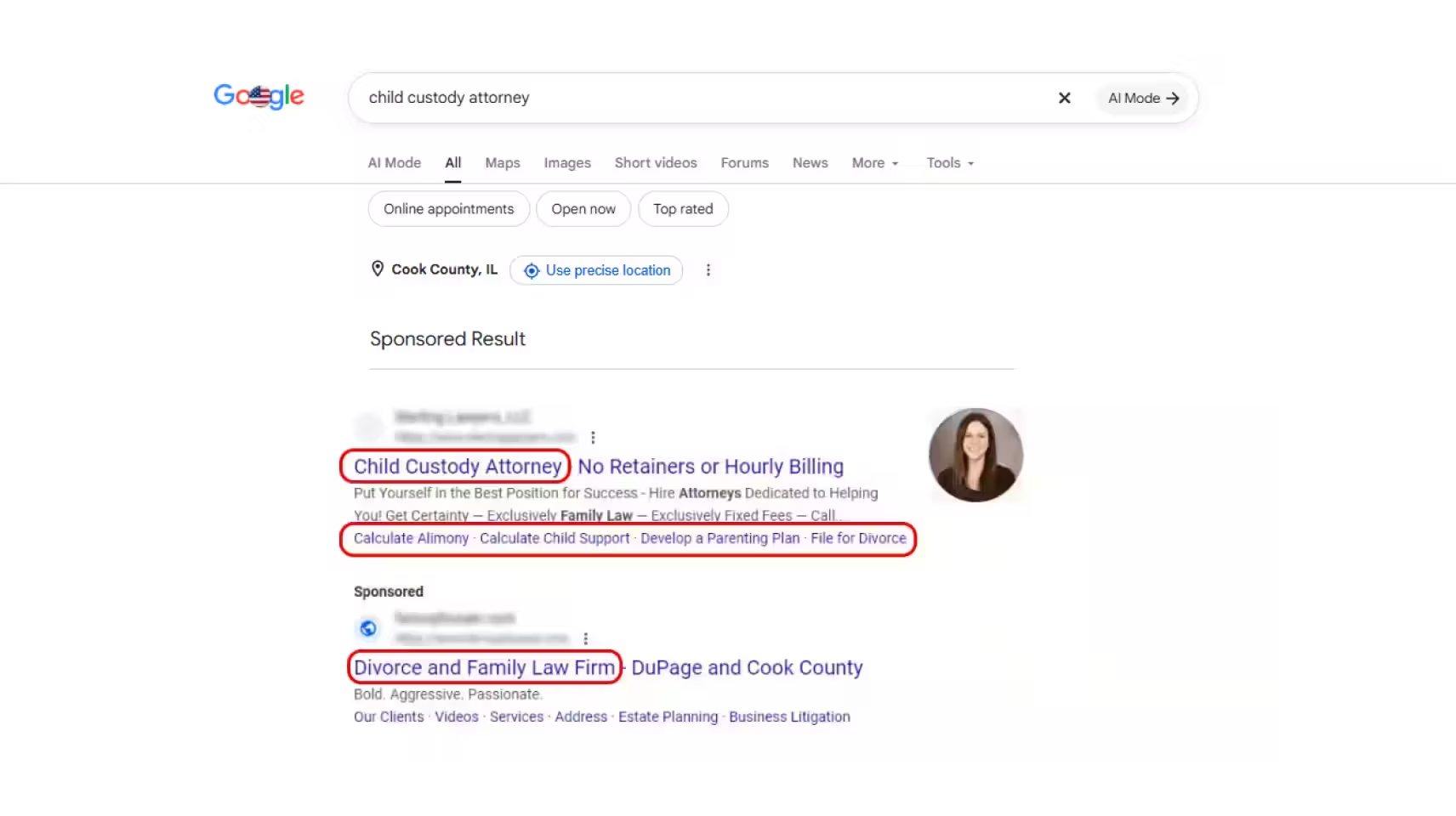
Assets are an important part of learning how to run Google Ads for lawyers.
Google stopped allowing new call-only ads in February 2026, and existing call-only ads are scheduled to stop getting impressions in February 2027. You can use call assets for phone inquiries.
9. Match the landing page and intake to the ad
After a prospect clicks on your ad, your landing page is the first real impression they get of your firm. Legal clicks are expensive. Your page must close that click (i.e. book a consultation).
The core rule: build a landing page specific to each ad group. A prospect who searched "car accident lawyer" should land on a page about car accidents.
A landing page that converts well usually includes:
- A headline that matches the ad they clicked
- Copy that explains why they should choose your firm for this specific case type
- A visible click-to-call or tap-to-call phone number
- A lead capture form that is simple and mobile-friendly
- Trust elements like bar memberships or verified client case studies and reviews
- Fast load times and a clean experience on mobile, since 63.9% of searches happen on a phone
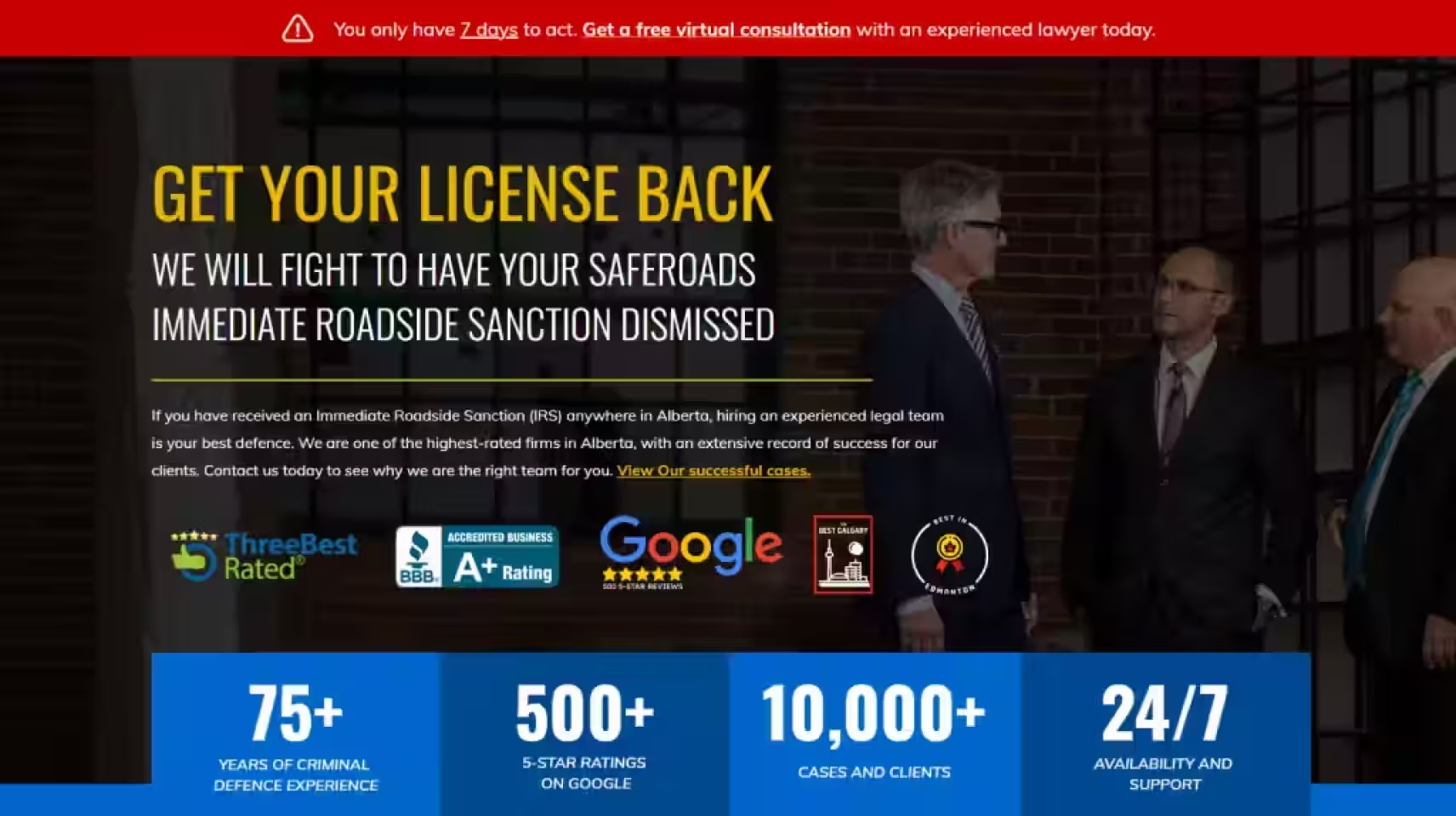
But your landing page is only 50% of the equation. Whoever answers your phone or follows up on a form submission needs to be ready with the same information the page promised.
If your ad and landing page focus on car accident cases, but the person answering calls doesn't know that's what the caller is asking about, you lose the lead, after having already paid for them.
For a fuller checklist, see our law firm landing page checklist.
10. Decide whether a separate brand campaign is justified
Brand keywords are your firm's name and the names of your attorneys.
But wait. Bidding on them isn't automatically the right move for every firm.
The case for it:
- Control. Bidding on your own name means your ad (not just your organic listing) shows up when you get searched for directly. You control what that ad says.
- Competitive defense. Competitors can bid on your firm's name too. If they do and you don't, they may show up above your own listing when someone searches for you by name.
- Lower cost. Brand keywords are typically far less competitive than service Google Ads keywords for lawyers, so the cost per click is usually low, even for a strong ad position.
The case against, or at least for waiting:
- Added complexity. It's another campaign to manage, track, and report on separately from your service-based campaigns.
- Diminishing returns if you already rank well. If your firm already holds a strong organic position for its own name, a paid brand campaign may add less incremental value than it would for a firm without that organic visibility.
- Attribution overlap. Brand traffic tends to convert well regardless of whether you're paying for it. These are people who already know your firm. Without careful tracking, it's easy to credit a brand campaign for clients who would have found you anyway.
Thinking about running a branded keyword campaign? Keep it as its own separate campaign rather than folding it into a service-based one.
That way, you can see its performance and cost clearly, and judge for yourself whether it's earning its place in your budget.
11. Check the campaign before launch
Before your Google Ads for law firms goes live, run through this checklist:
- Geography. Confirm your targeting matches your actual serviceable area, not just your office location.
- Budget and bidding. Confirm your daily average budget and bidding strategy are set the way you intended.
- Final URLs. Confirm every ad points to the correct, live landing page, not a placeholder or an old page.
- Conversion tracking. Confirm the tracking you set up in step 2 is active and firing correctly. Test it yourself before launch if you can.
- Policy disapprovals. Check for any ads or assets flagged during review, and resolve them before spending starts.
- Phone and intake readiness. Confirm your phone lines are staffed, and your intake team knows this campaign is going live, and knows what to expect from it.
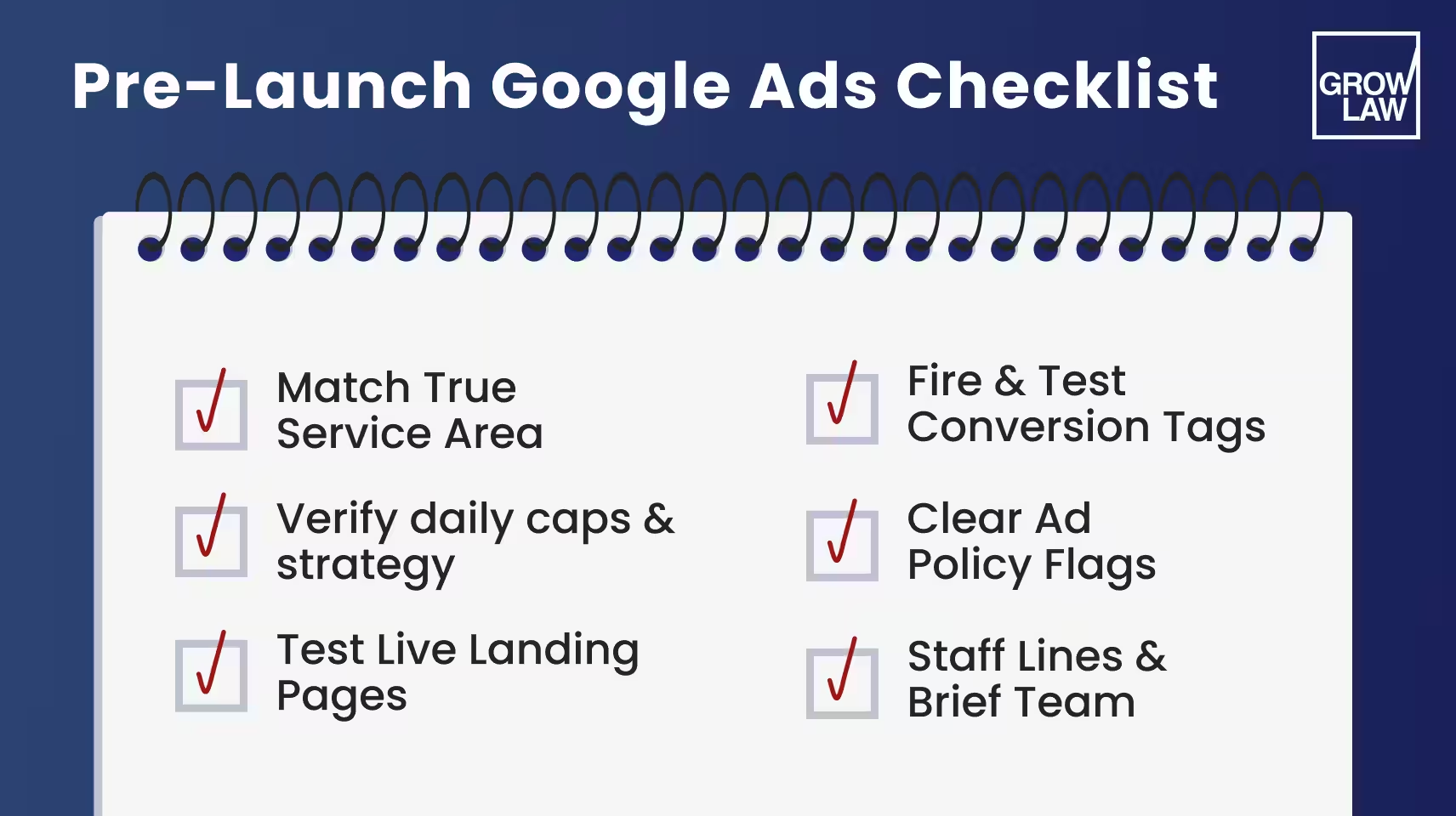
A Google Ads for lawyers campaign that only runs for two weeks still needs accurate tracking; otherwise you're paying for clicks with no way to measure what they produced, and you learn nothing from the two weeks you just paid for.
12. Optimize for qualified leads and retained clients
Launching a Google Ads for law firms campaign is the start. Once it's live, the work shifts to review:
- Search terms. Check what people actually searched to trigger your ads. Add irrelevant terms as negatives as you find them, don't wait for a scheduled review.
- Wasted spend. Look for ad groups or Google Ads keywords for lawyers burning budget without producing qualified leads, and adjust or pause them.
- Conversion definitions. Revisit what counts as a "qualified lead" periodically. As your intake process evolves, make sure your tracking still reflects it accurately.
- Downstream results. Don't stop measuring at the click or the form fill. Track how leads move through qualification and into signed cases, since that's the only way to know if a campaign is actually working.
This is also where the acceptable acquisition cost you set in step 1 gets tested against reality.
If your cost per signed client is creeping above what you decided you could afford, that's a signal to adjust targeting, bidding, or your funnel.
One Firm's Result: 50% Lower Cost Per Lead
This is exactly what our PPC management is built for. You own your ad account, your spend goes straight to the platform, and every week, we're in there checking whether that spend is turning into qualified leads and signed cases.
One client: KJT Law Group, whose Google and Microsoft Ads campaigns we manage, saw their cost per lead drop by 50%.
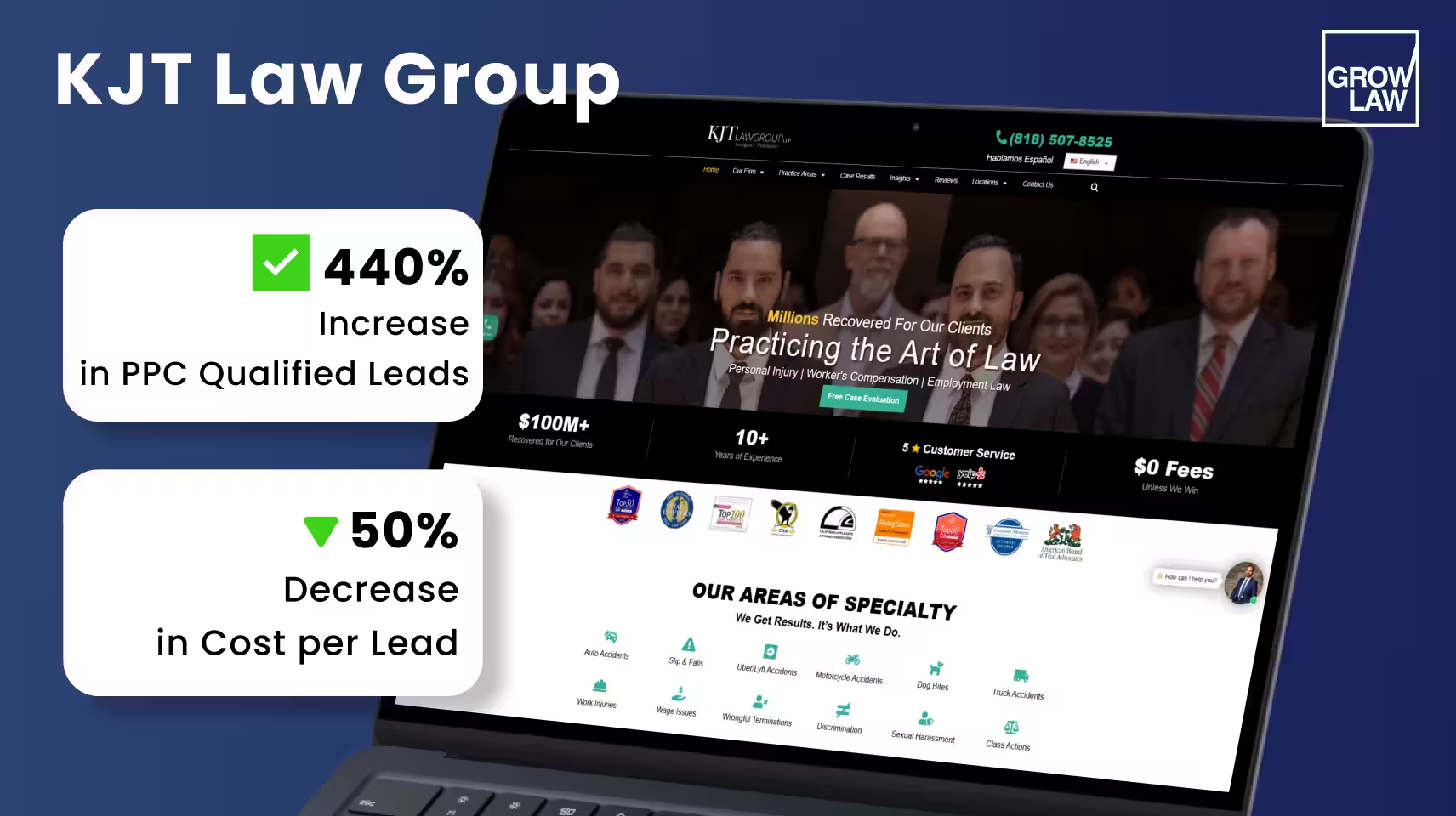
We can't promise every firm gets KJT Law Group PPC results. But it's a good example of what happens when an expert is paying attention to your campaigns every week.
5 Google Ads Mistakes That Waste a Law Firm's Budget
We've been managing Google Ads for law firms for over 18 years. In that time, we've seen almost every law firm make at least one of these 5 mistakes before they came to us.
To be fair, they're easy to miss.
1. Mistake: Mixing Search Intent in One Ad Group
Symptom: One ad group holds a mix of informational, commercial, and transactional keywords. The ad and landing page end up generic enough to sort of fit all of them and really fit none.
Correction: Separate keywords by intent. A firm that groups "personal injury lawyer" (broad, mixed intent) with "personal injury lawyer free consultation" (clearly transactional) in the same ad group will struggle to write copy that speaks to both.
Split them, and let each ad group's copy match the specific intent behind its keywords.
2. Mistake: Careless Negative Keywords
Symptom: Ads show up for searches that have nothing to do with what the firm handles, wasting clicks, or a blanket negative accidentally blocks searches the firm actually wants.
Correction: Build your negative list from your actual search terms report. A defense attorney who doesn't handle traffic cases should exclude "traffic" and "DUI."
But watch for negatives that cut too wide: excluding "free" as a blanket rule blocks people searching for a free consultation, if that's something the firm actually offers. Review negatives regularly as new irrelevant searches show up.
3. Mistake: Optimizing Toward Raw Leads Instead of Qualified Ones
Symptom: A campaign looks like it's performing well because cost per lead is low, but the leads it's producing don't fit the firm's practice area, geography, or case criteria, and few of them ever get signed.
Correction: Track qualified leads and signed clients, not just form fills and calls (see step 2). A cheap lead that never converts to a client isn't cheap.
If you're optimizing your bidding toward "conversions" but haven't defined a conversion as a qualified lead, you're optimizing toward the wrong number.
4. Mistake: Poor Fit Between the Ad, the Landing Page, and Intake
Symptom: High bounce rates, low conversion rates, or leads that arrive confused about what the firm offers, even though the ad itself gets clicks.
Correction: Slow-loading pages, broken links, cluttered layouts, and a lack of mobile optimization all quietly kill conversions before they even reach your form.
Beyond the page itself, check that whoever answers the phone or follows up on a form has the same information the ad and page promised.
A car accident ad sending someone to a generic contact page, or to an intake team that doesn't immediately recognize why they're calling, loses leads you already paid for.
5. Mistake: Assuming Automation or Remarketing Works the Same for Every Practice Area
Symptom: Turning on automated bidding or broad remarketing without checking whether it's appropriate, or even allowed, for the specific service being advertised.rection: Automated bidding strategies like Target CPA need real conversion data to optimize toward (see step 6); turning them on too early can do more harm than good.
Remarketing has its own limits: Google restricts advertiser-curated remarketing audiences for certain sensitive legal services. Broad "remarket to everyone who visited the site" advice doesn't apply evenly across every practice area.
Check what's actually permitted for your specific service before assuming a tactic that worked for one campaign will work the same way for another.
Google Ads and SEO: How They Work Together
Both SEO and Google Ads can bring in clients, but they work differently.
| Google Ads | SEO | |
|---|---|---|
| Visibility | Starts once your campaign is live and approved | Builds gradually as your site earns authority |
| Cost | Pay-to-play: traffic stops when spend stops | No per-click cost once pages rank |
| Best for | Testing offers and services, generating leads while organic presence is still developing | A foundation that keeps paying off long-term |
Neither one replaces the other. Many firms run both, using Google Ads for immediate visibility and SEO for traffic that keeps coming in at a fraction of a paid ads investment.
Get More Accountability from Your Google Ads Budget
Running Google Ads (well) takes more than launching a campaign and checking back once a month. You’ll blow through your budget with no real leads.
You must tightly optimize everything from your copy to your targeting, and track every click to see whether it produced a signed client.
That's how we manage Google Ads at Grow Law. You own your ad account, and your spend goes directly to the platform.
We set up call and form tracking, qualify leads instead of lazily counting each one as a conversion, and review every campaign weekly. You can see what your spend is producing in terms of leads and signed cases.
Would you rather have that kind of accountability built in from the start? Our law firm PPC management team is happy to help you set it up.
Frequently Asked Questions
Got questions? We've got answers. Here's what law firms ask us most about running Google Ads.
-
How do Google Ads work for law firms?
You bid on keywords relevant to your services, and Google runs an auction to decide which ads show for a given search. When someone clicks, you pay, and that click becomes an inquiry only if they call or fill out a form. Local Services Ads work differently: instead of paying per click, you pay per lead, and eligibility depends on passing Google's screening process for your market.
-
Are Google Ads worth it for lawyers?
It depends on your funnel and your intake. There’s no one universal return every firm gets. A firm that tracks conversions well and can handle the leads it generates tends to see a strong return; a firm that can't follow up quickly or doesn't track past the click level often doesn't, regardless of how the campaign is built.
-
How much do Google Ads cost for lawyers?
Across the legal industry, average cost per click sits around $9.87 and average cost per lead around $131.63, based on a 2026 benchmark covering over 13,000 campaigns. That's sector-wide context, not what you'll pay. Also separate media cost (what you pay the platform) from total acquisition cost (media spend plus management fees), since media cost alone understates what a client actually costs to acquire.
-
How do lawyers choose keywords for Google Ads?
Start with your service and location, then layer in intent: informational, commercial, or transactional. There's no universal "best" keyword list, what works depends on your practice area and market. Review your actual search terms report regularly and let real search data guide your negative keywords and refinements. Don’t rely on assumptions.
-
What is a good Google Ads budget for a law firm?
There's no fixed minimum that applies to every firm. Work backward from your retained-client goal through the funnel: how many signed clients you want, divided by your funnel's conversion rates at each stage, gives you the ad spend required. Use estimated rates to forecast before you launch, then replace them with your own measured data once the campaign is running.
-
How can law firms reduce Google Ads costs?
Reducing your CPC alone doesn't reduce your real cost of acquiring a client. Focus instead on cutting irrelevant clicks with better negative keywords and tighter targeting, and on improving how well your leads qualify and convert. A cheaper click that never turns into a client isn't actually cheaper.
-
What conversion rate should law firm Google Ads achieve?
First, define what counts as a conversion for your firm: a form fill, a qualifying call, a signed client, since each answer means something different. The legal industry's average conversion rate is 5.55%, but that's sector-wide context, not a target, and it's not the same as your retained-client rate.
-
How do lawyers measure ROI from Google Ads?
ROI should be based on attributable contribution (collected fees, minus the cost of delivering the work) against your total marketing costs. Make sure the time period you're measuring client acquisition in lines up with the time period you're measuring collections in, since cases don't sign and pay on the same day.
Have you ever poured $2,000+ into ads that brought zero clients? Ouch! We’ve been there.
The legal ad world is cutthroat. CPCs now range from $10 to $100+ per click. Yet, the opportunity is there! Firms that dial in their targeting see up to 200% ROI and convert at ~7% or 7 out of every 100 visitors.
So how do you compete — without going batcrap crazy?
This guide breaks down 12 super simple steps to help you get the maximum ROI from every last dollar. We're dialing it up on ALL fronts: smarter keywords, tighter ad copy, and better targeting. Let's go!
Key Takeaways:
- How Google Ads for lawyers works, and why the highest CPCs can still deliver incredible ROI!
- 12 steps to run profitable campaigns, from keyword research to landing page optimization.
- The secret to smarter targeting to start attracting ready-to-hire clients.
- Pro tips to rule your local market, including Google Local Service Ads, dynamic keyword insertion, and ad group clustering.
- 5 costly mistakes to avoid, like ignoring Quality Score, skipping negative keywords, or letting your landing pages tank your conversions.
Make Your Ads Pay You Back
Join the league of highly successful lawyers! Our clients see up to 3.8× ROI by combining Google Ads with top-tier SEO.
Contact Us Today
What Is Google Ads for Lawyers?
SEO (search engine optimization) takes 3 to 6 months to get leads.
Google Ads work instantly!
Your law firm ad appears at the top of Google search results when people look for the exact legal help you offer. That could be “divorce lawyer in Chicago”, “personal injury attorney near me", etc.
It runs on a pay-per-click (PPC) model, meaning you pay for every ad click. Each click may (or may not!) bring a potential client to your website.
And it’s no small market — in Q3 2024 alone, Google Ads brought in $65.9 billion in revenue!
For law firms, Google Ads captures people at the precise moment they’re ready to call, book a consultation, or start working on their case. Pretty useful, right?
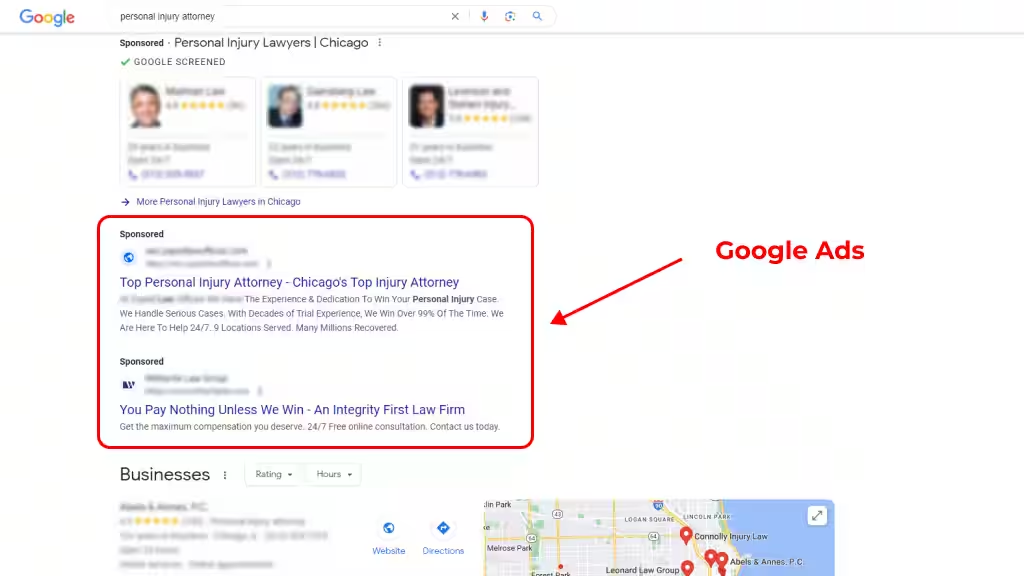
One of the key features of law firm Google Ads is keyword targeting. You can target specific keywords that are relevant to your law firm or legal services. Google Ads for attorneys also allows you to create compelling ads that are designed to capture the attention of potential clients. You can create text, image, and video ads that include a clear call-to-action (CTA) that encourages users to click through to your website or contact your law firm.
Google Ads Management for Lawyers: 12 Tips to Skyrocket Your Campaigns
Alright, you’ve waited long enough — let’s get to the good stuff!
With legal clicks costing $10–$100+, every ad matters. These 12 steps will walk you through how to manage your campaigns to get the highest payback humanly possible.
1. Start With Keyword Research
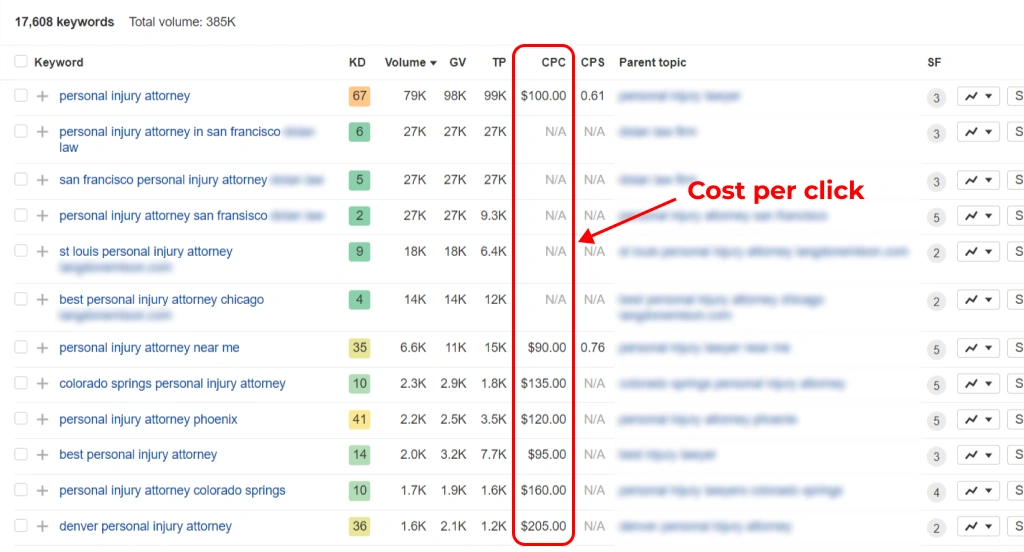
If you decide to invest in Google Ads for law firm marketing, you'll want to conduct keyword research prior to going any further with your ad campaign. There are paid keyword tools you can use for this purpose, but if you have a Google Ads account, there is a free tool available for you to use.
That's the Google Ads Keyword Planner. This tool allows you to enter and research any keyword phrase to get an estimate of its cost per bid, competition, and search value.
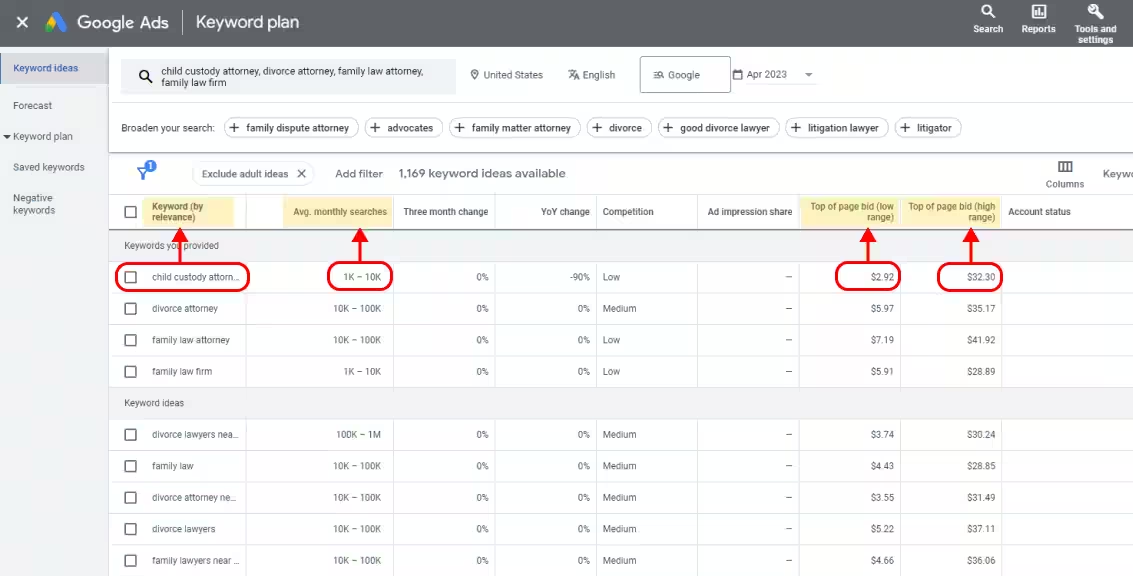
The idea is to determine which keywords will be most valuable to your firm. This value is usually related to the relevance of the term to your area of practice and other details. Imagine that you have a criminal defense practice in Springfield, IL. Will you get more leads from “criminal defense lawyers” or “criminal defense attorney in Central Illinois”?
Before you spend a single dollar, you need to know which keywords bring clients.
Every keyword has an intent behind it. Law firm marketing Miami campaigns should separate informational searches, commercial terms such as “best divorce lawyer in Miami,” and transactional queries from people ready to hire.
Use tools like Google Keyword Planner, Ahrefs, SEMRush, or Moz Keyword Explorer to find and analyze these terms. Start with a base keyword (like “estate planning lawyer”), and look for variants with solid search volume but manageable competition.
Pro tip: Prioritize keywords that match hiring intent — they may cost more per click, but they attract clients who are ready to sign!
Pro Tip 1: Focus on Longtail Keywords
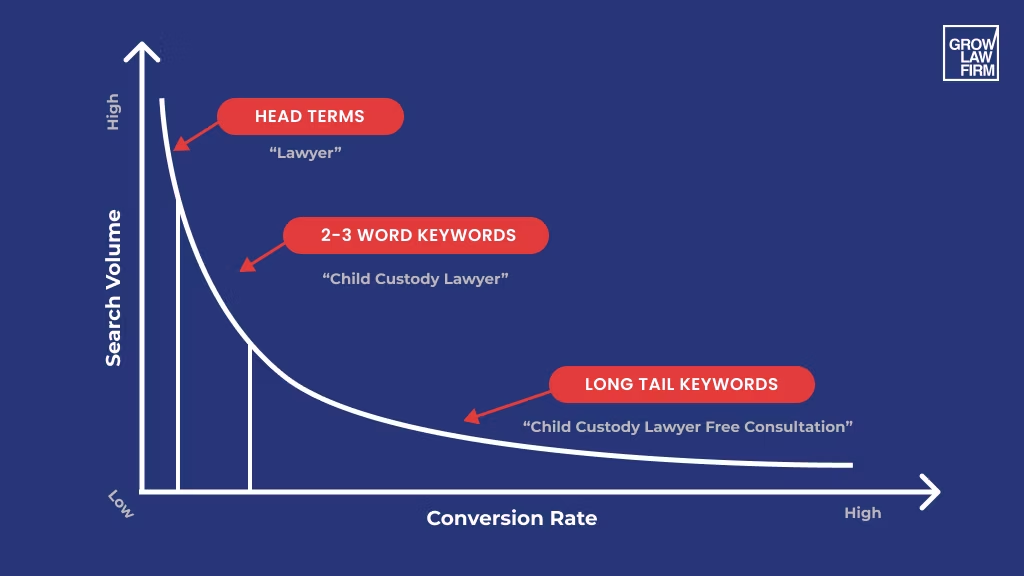
Long-tail keywords are the best way to generate higher-quality leads in Google Ads. There is competition over simple keywords, and only the firms with the largest Google Ads budget are able to compete for them. Instead, focus on keywords that specifically target the user's search intent. For example, a simple term like "attorney" can be built on to create several long-tail keywords that are more likely to match the search phrases your potential clients use. So, “Attorney” becomes “immigration attorney free consultation.”
2026 edition
How to Get More Clients for a Law Firm
Download Checklist
Pro Tip 2: Use Different Keyword Match Types
In Google Ads for law firm marketing, your keywords will be categorized according to match type. These keyword match types help to determine which Google searches will trigger your ads to appear. There are several keyword match types for search ads:
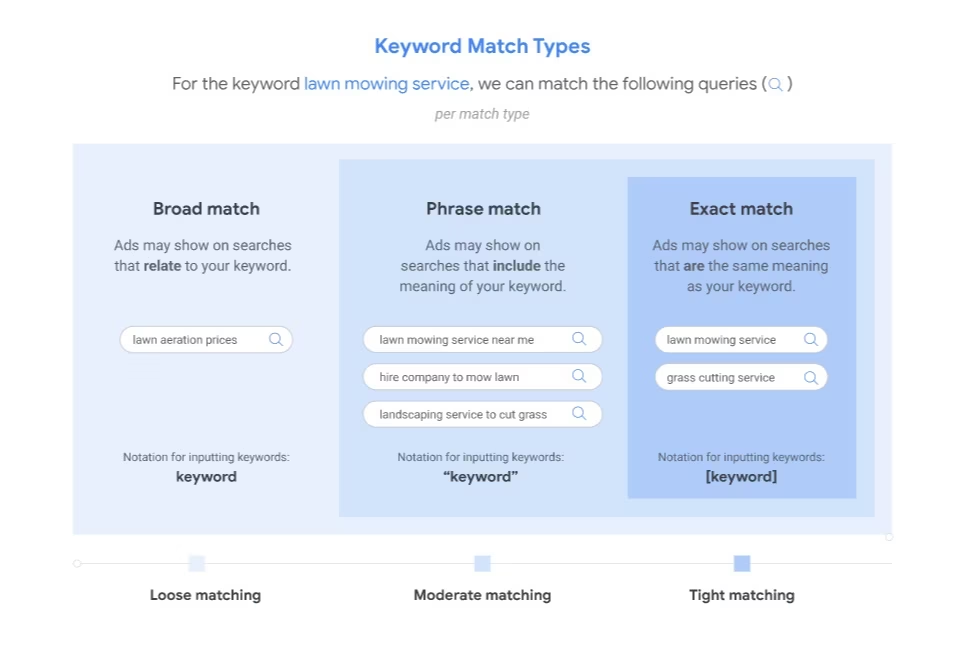
Broad match, which triggers your ads to display when users search for that exact search phrase, synonyms, plural forms, spelling errors, and related search terms. So the key phrase “criminal attorney” may also be triggered by searches for “defense attorney.”
Phrase match, which displays ads for the exact keyword phrase or close variations. These include singular and plural, synonyms, abbreviations, longer variations, and the use of keywords in a different order.
Exact match, which is the most specific keyword grouping. Here, ads are only triggered by the exact search term or a very close variation.
Negative matches, which are phrases that should not be included in the search if your ad is to appear. For example, you may be a defense attorney who doesn't handle traffic law cases. You can include words like “traffic," “DUI," “speeding," and other such terms as negative keywords. Then, anyone using these terms won't see your ads.
2. Incorporate Your Keywords into Your Law Firm Google Ad Campaign
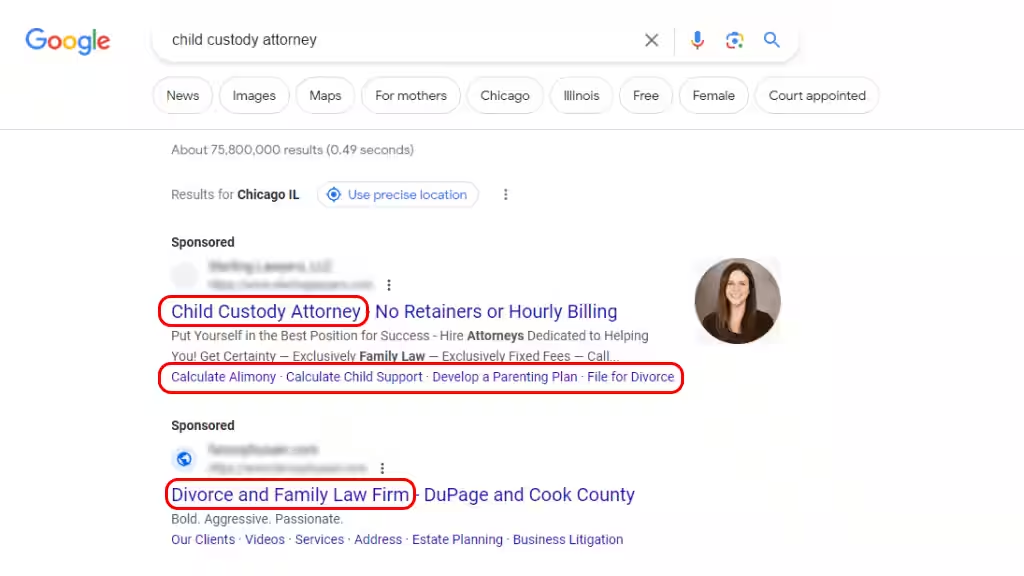
When you create the copy for your web pages, you can optimize it by using keywords that will improve organic search results. You will need to do the same for your Google PPC ads.
Ideally, your target keywords will appear in several places, including:
- The Google Ad headline
- The ad copy
- The ad web address (URL)
- Any ad extensions
You may not necessarily be able to add your target keywords to every element of your Google Ads content. However, you can get good results by using three at a minimum.
Quality Score is the metric that Google uses to determine how relevant keywords are to your PPC campaign. Your campaigns will see a better return on investment if you can improve this score. You can do this by ensuring that your keywords appear in both your ad and the landing page that users visit when they click that ad.
Including your keywords on the landing page communicates that it is relevant. This setup increases trust, improves the user experience, and boosts conversion rates. All of these things will improve the Quality Score of your ad campaign.
Pro Tip 3: Google Local Ads Services for Lawyers
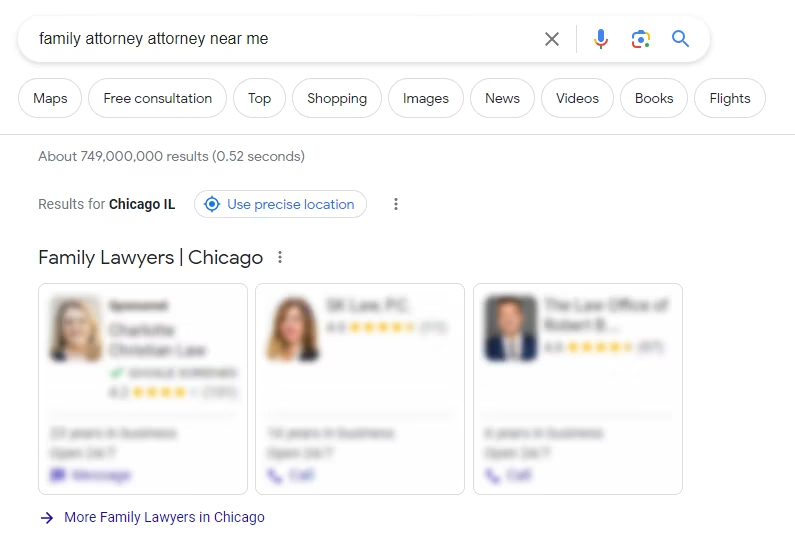
Google local services ads for lawyers are intended for attorneys who service clients locally. When you use Google local service ads for attorneys, you make your ads more visible to people conducting local searches. This visibility will increase your click-through rates and allow you to reach your target audience.
The right Google services ads for lawyers allow your pages to show in search results pages for local search inquiries. Your potential clients can contact you directly from the ad. They don't have to enter your website or dial their phone to do so.
Pro Tip 4: Demographics and Targeting Can Help
Since lawyers and law firms tend to serve a specific area, you need to start with location-based targeting to target prospective clients searching for services in your location. This is mainly because lawyers licensed in one state can only practice in that state. For example, a personal injury lawyer in Los Angeles should only target people who are searching for legal services in the Los Angeles area and potentially a little further out.
There is also a radius feature that you can use to target prospective clients who are within a predetermined distance of your practice. With radius targeting, you can also use targeting exclusions to indicate that certain geographic areas should not be shown your ads.
The other type—demographic targeting—ensures that ads are displayed to users who are most relevant. You can target based on age, income level, marital status, and more. So, a law firm that specializes in family law, needs to target people within a certain age range who are married and have children.
Pro Tip 5: Incorporate dynamic Keyword insertion
Dynamic Keyword Insertion (DKI) is a feature in Google Ads that allows advertisers to automatically insert the keyword that triggered their ad into the ad copy. You can insert keywords into headlines, descriptions, and display URLs. Let’s say your target keyword is “car accident lawyer in New York,” your ad headline might say something like:
Need a Lawyer? Call John Doe, Car Accident Lawyer in New York.
This functionality allows you to combine keywords to create unique but targeted ad variations. It increases ad relevance to searchers and can improve click-through rates.
3. Choose Your Bidding Options for Google Ads Campaigns Smartly
Your law firm's Google Ads campaign's success depends on the bid option you choose. There are several bidding options available, including Cost-per-click (CPC), Cost-per-thousand-impressions (CPM), Cost-per-acquisition (CPA), and Target return on ad spend (ROAS).
CPC is the most common bidding option and allows you to pay each time someone clicks on your ad. CPM is based on the number of impressions (times the ad is shown), while CPA allows you to pay only when someone takes a specific action, such as filling out a contact form or making a phone call. Target ROAS is a bidding option that allows you to set a target return on your ad spend. This means that Google will automatically adjust your bidding to achieve the target ROAS.
The keyword bidding options you choose also depend on your goals and budget. It is important to find a balance when bidding to avoid overspending; this means not bidding too high or too low. To strike a balance, you can use tools like Google Ads Keyword Planner to analyze which keywords will provide the most value based on a range of metrics, including high and low range top of the page bid, search volume, and competition level.
4. Place Bids on Your Law Firm's Brand Unique Keywords
Your brand’s unique keywords are the words or phrases that are specific to your law firm, such as your firm's name or the names of your partners. Bidding on your own brand keywords can help you control your online reputation and increase your click-through rate so your ad appears at the top of the search results for searchers who will click on your ad and visit your website. It also helps defend against competitors since they may bid on them; you do not want that to happen.
It's also important to consider the cost of bidding on your own brand keywords. Since these keywords are typically less competitive, they may have a lower cost-per-click than other keywords in your campaign. This means that you may be able to bid lower on them and still achieve a high ad position. Just set a reasonable bid.
5. Optimize Your Law Firm Landing Page
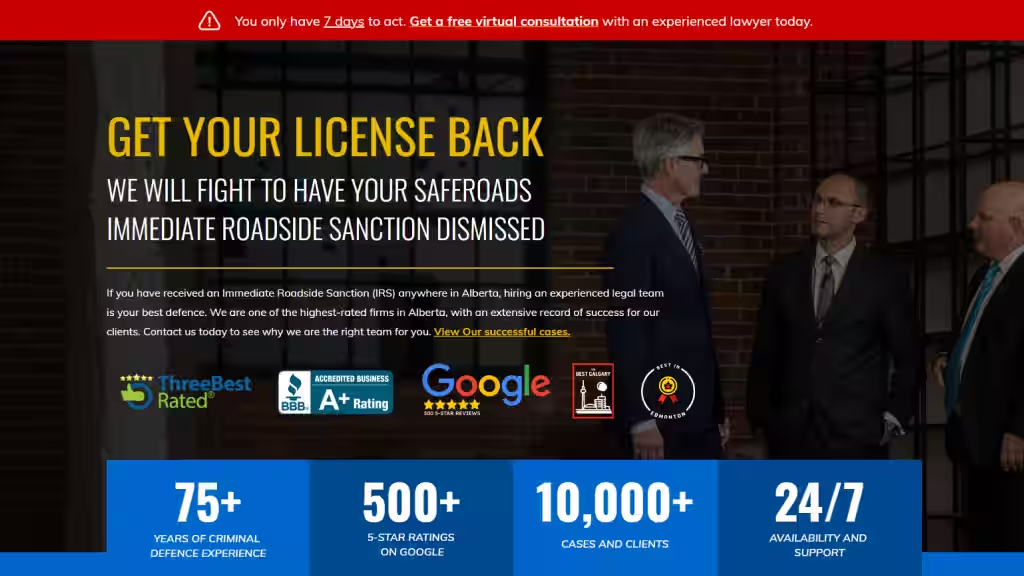
Landing page for lawyers are the first website experience that those who click your ad will have with your law firm. Since PPC is expensive in the legal field, you will want your landing page to perform quite well. It's imperative that your landing pages are relevant to the keywords that the prospect used to see your ad in the first place. To ensure this, you will want to create a custom landing page for each ad group.
A landing page with a high conversion rate can be made by following these tips:
- Use an attention-grabbing headline that aligns with the ad text
- Write ad copy that further details why prospects should choose your firm
- Include a click-to-call or tap-to-call phone number
- Implement user-friendly lead capture forms
- Incorporate relevant videos such as client testimonials
- Add trust elements such as membership badges and ratings
- Integrate chatbot technology to provide 24/7 support
6. Decide Your Google Ad Campaign Goal
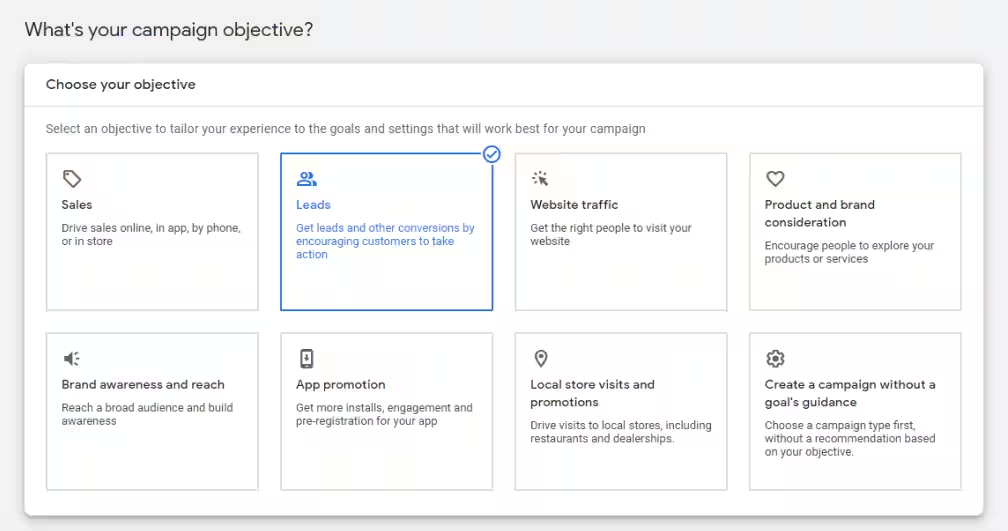
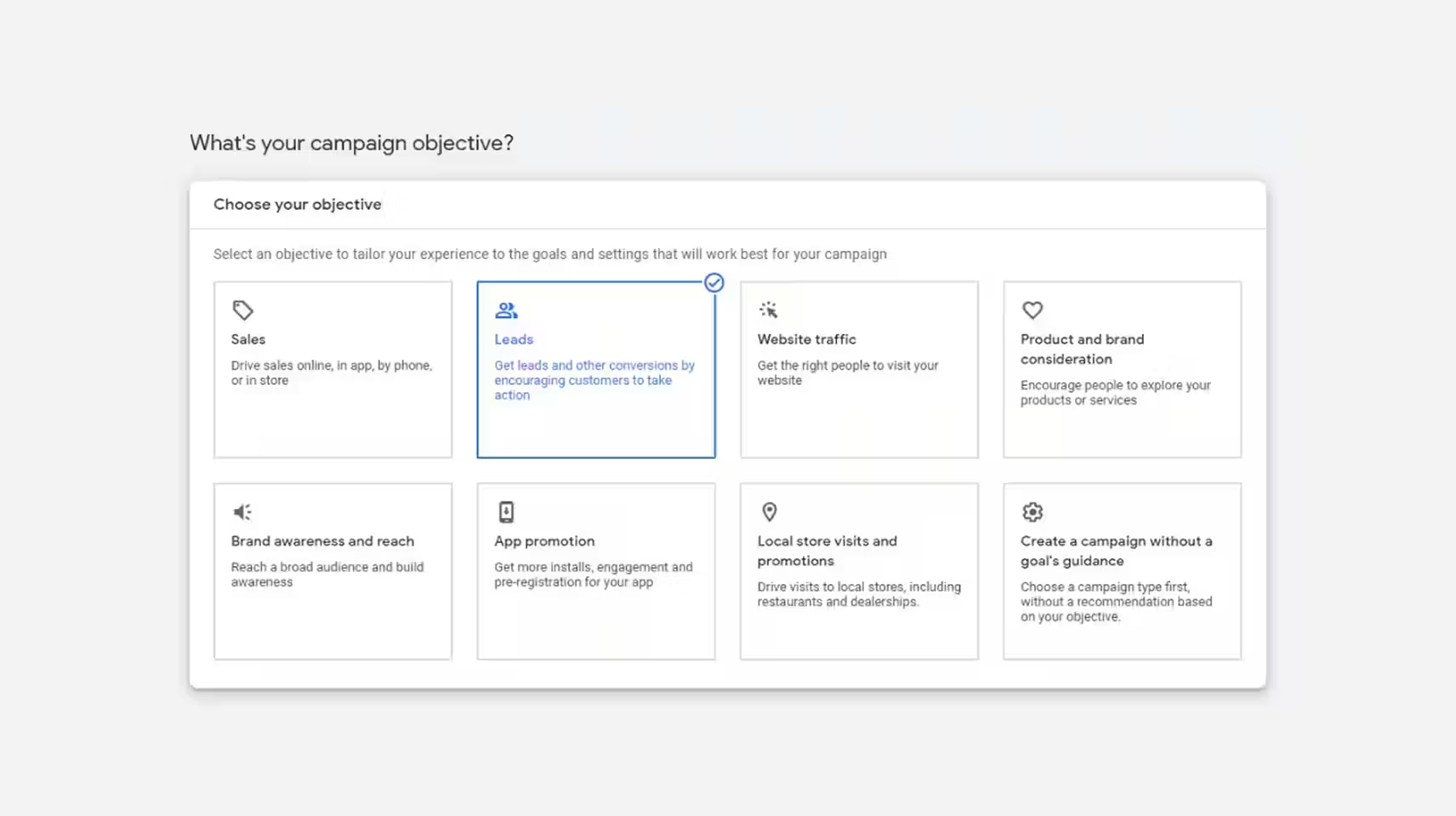
You will start to build your Google Ads for law firms by selecting a goal. Each goal Google lists includes help text that provides additional information about it — just hover your mouse pointer over it.
To have your Google ad show in search results, you will need to choose a goal that relates to the campaign type “search.” Google Ads' options for search include the following campaign goals:
- Website traffic
- Leads
- Sales
If you want to receive calls directly from Google users, select leads or sales. For the most part, your law practice ad campaigns will use sales or leads as the primary goal.
7. Choose Your Google Ad Campaign Type
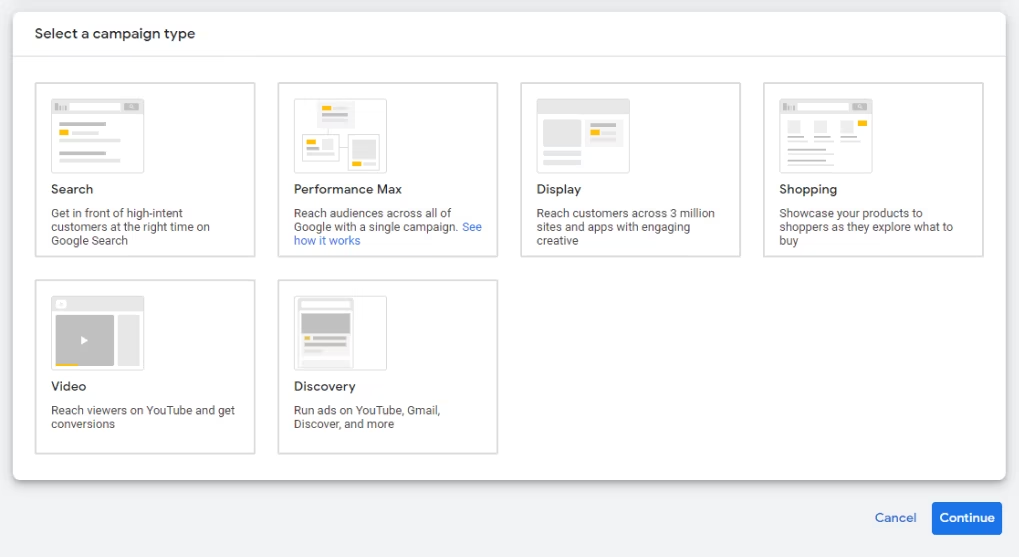
Now, you will choose your Google campaign type. You'll select "search" for this. This option ensures your law firm's ads appear on search engine results pages (SERPs).
It's important to know that even if you select "search" as your campaign type, your ads will show on the display network by default. However, you can turn this setting off even after your ads campaign has launched. It's a good idea to take this step.
You don't want your search ads converted into images and broadcast as display ads unless you change other settings. Otherwise, your impression metrics will increase, and your campaign performance will dwindle.
To identify your campaign goals, you have to know what you want users to do in response to your ad. For example, should they call your firm or go to a page on your website? There are checkboxes for you to select the specific results that you want.
8. Customize Google Ads Settings
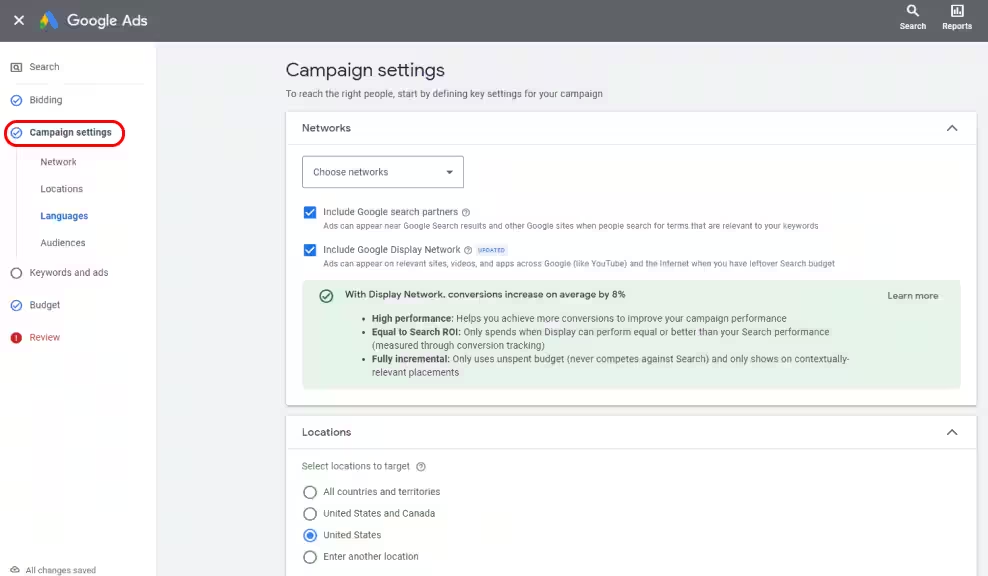
You will enter your website and phone number. After that, you can customize your campaign's general settings. Start by reviewing the settings you have thus far, then name your campaign.
Make sure to deselect the option for display or other networks suggested by Google Ads. Otherwise, you will spend some of your advertising budgets on those media instead of Google search ads.
To be clear, the display network isn't a bad option for advertising. It works very well for remarketing and brand awareness. For example, you could share a display ad with people who have already visited your website at least once.
However, if you want to display ads to be effective, you really need a separate, dedicated campaign strategy for those ads. They use visual elements and need content that is specifically created for display ad networks.
9. Determine the Beginning and End of Your Campaign
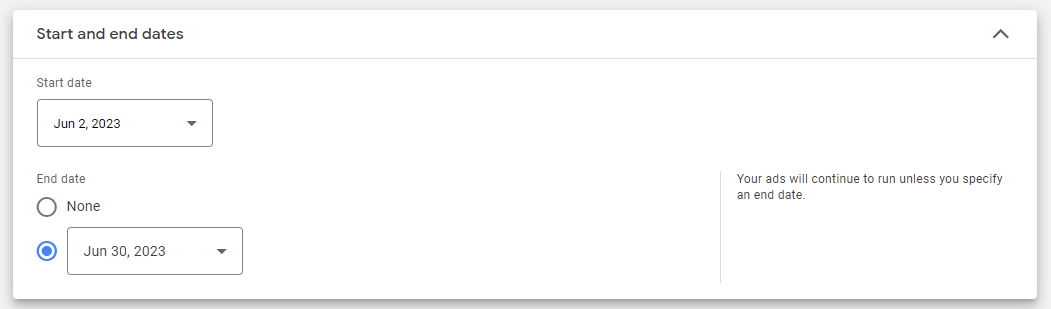
Under the "general settings" section, there is a link to show more settings. Click on this, and you will be able to set the start and end times for your PPC campaign. You don't have to do this, but it can help to keep your ad spending under control. If you do not select this option, your campaign will be ongoing, and you will pay for any clicks your ad gets.
You will also see campaign URL options and dynamic ad settings. These allow for detailed campaign tracking. However, most lawyers won't require this much detail.
10. Track Your Conversions from Google Ads Campaigns
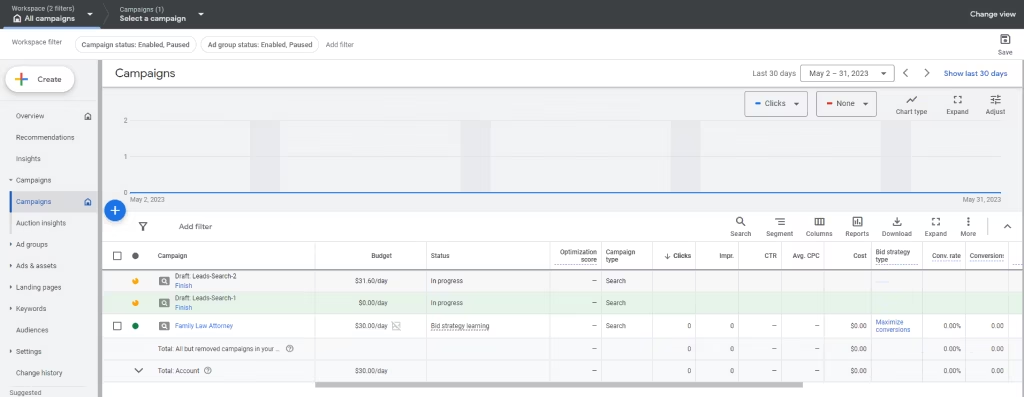
There is a conversion tracking option in the Google Ads settings. If you aren't tracking conversions already, you can click on that link, and you will be able to set up tracking. When you do this, Google Ads will be able to recognize when someone who clicks on your search ad takes a conversion action on your website.
Google Ads will show you the steps you will need to take to track those website conversions. For example, if you track the people who complete lead capture firms, you will have to add a bit of code to the confirmation page that displays after users enter their information.
Conversion tracking can be complicated. You may want to get help implementing this unless you happen to know HTML. It's also important to be aware of what to expect from a Javascript snippet before you install it on your website.
11. Build Your Attorney Ad
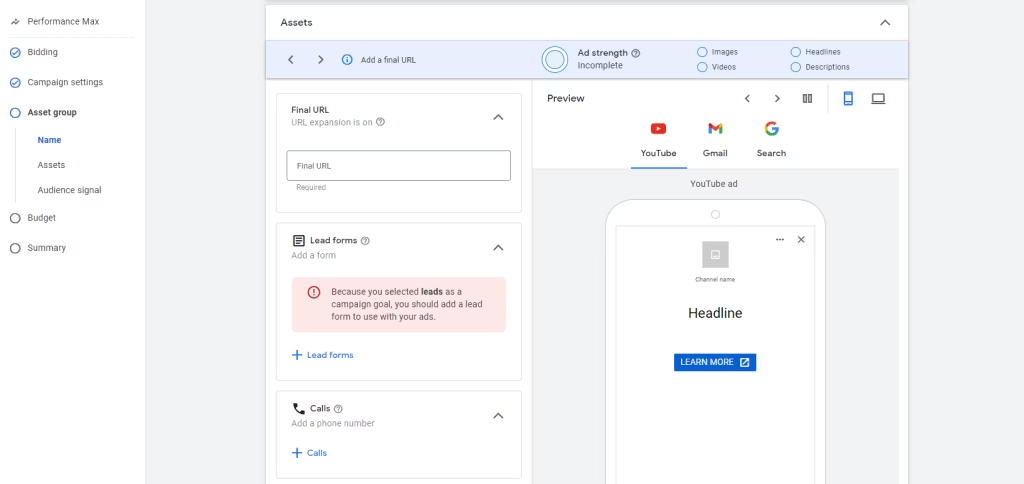
Google Ads recommends that you have at least three ad creatives for each ad group. This selection gives Google Ads the best chance of serving a top-performing ad to your target prospects.
In Google Ads for Search, you are able to add text to the headline and description for your ad. If you have created ad extensions previously, these will also appear in the preview. The specifications for these texts are as follows:
- Headlines 1,2,3 — 10 characters each, Headline 3 is not always shown
- URL Display Path 1 — 15 characters
- URL Display Path 2 — 15 characters
- Description 1,2 — 90 characters each
Each separate headline is pipe separated. Additionally, the first description line will have a period added to it automatically. You will probably have to experiment a bit before your Google ad copy looks exactly the way you want it to.
As you edit your ad copy, make sure to view the results on both mobile and desktop platforms. You want your ads to be effective on both. Sometimes ad text will be truncated with ellipses. If that copy is important, you can have it included in an ad extension or callout.
You can re-enter your ad extensions easily. Start by saving your ad. Then navigate out to the ad extensions dashboard for your Google PPC campaign. There, you can add a new extension or edit one that you have already created.
After you have finished, you can navigate back to the ads tab. Then, finish working on your ad creatives. You can also toggle back and forth until you think your ad copy and extensions work well together.
If you aren't sure what you should put in your Google Ad copy, you can use the Ad Preview and Diagnosis tool again. Just look up the keyword phrase for your ad group. Then, see what the competitor ads that are on top of the search results pages look like. Do this for both mobile and desktop.
You will be able to see the ad copy that your competitors are already using to attract your target clients. Use their copy as inspiration or as something to improve on. In any case, you need to make sure that your ad copy aligns with the landing page you serve and that both match user search intent.
12. Organize Ad Groups by Thematic Clusters
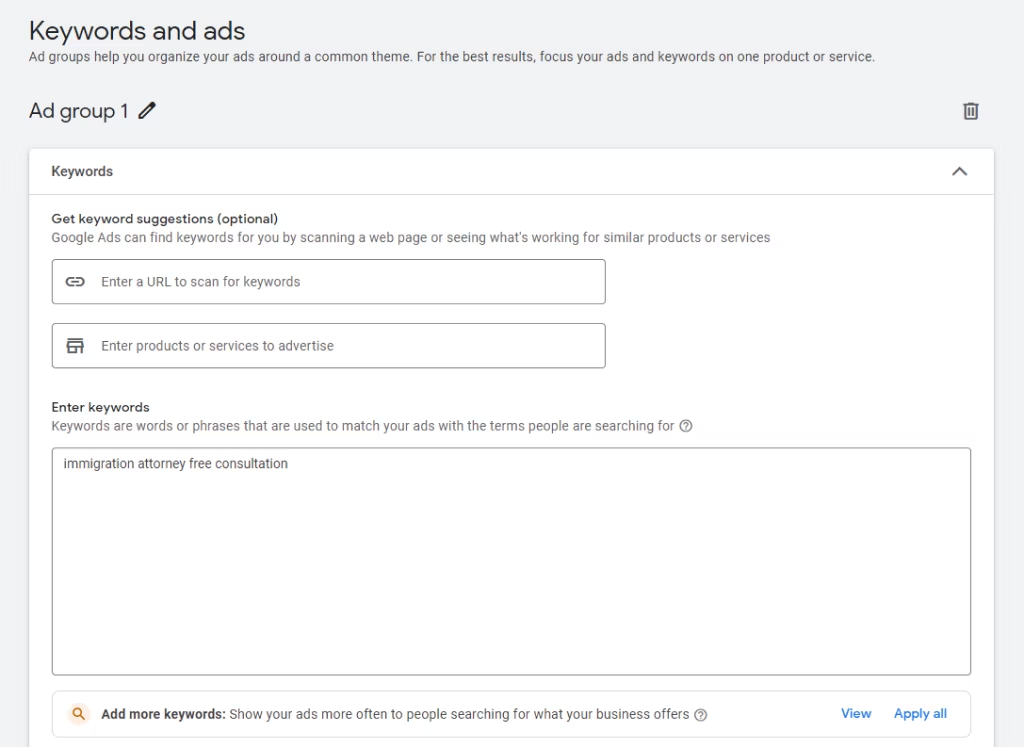
This strategy might sound like more work for your law firm- but it does go a long way. It involves grouping keywords and ads together based on the theme of your legal services. So, if your law firm specializes in personal injury cases, you could create an ad group for car accidents, another for slip and fall accidents, and so on.
This helps you create more targeted ad copy and landing pages that are specific to each type of case. This can improve the quality score of your ads, which can in turn reduce your cost per click and increase your ad ranking. Organizing your ad groups by thematic clusters also makes it easier to track the performance of your campaigns. You can see which ad groups are performing well and which ones need improvement.
Pro Tip 6: Employ Single Keyword Ad Groups for Top-Performing Keywords
Single Keyword Ad Groups (SKAGs) are a strategy in which you create an ad group for each individual keyword in your campaign. You must first determine your top-performing keywords using information from your ad campaign before implementing SKAGs for your legal firm's Google Ads. Next, divide each term into its own ad group and use it as a single keyword in the ad group. Make sure to include the keyword in both the headline and the body of the ad content, and then construct an ad copy that precisely fits the user's search query.
Level Up Your Brand
Book a Free Consultation
Google Ads for Lawyers: 5 Mistakes to Avoid
— Using Too Many Keywords
"Keyword stuffing" is just what it sounds like. It involves inserting too many keyword phrases into a website in order to attempt to cause the page to rank for those keywords.
Today, Google runs advanced algorithms that detect keyword stuffing and ensure stuffed content isn't given high priority. It is much more effective to create quality, relevant advertising content than to repeat the same phrase multiple times.
— Passing over Negative Keywords
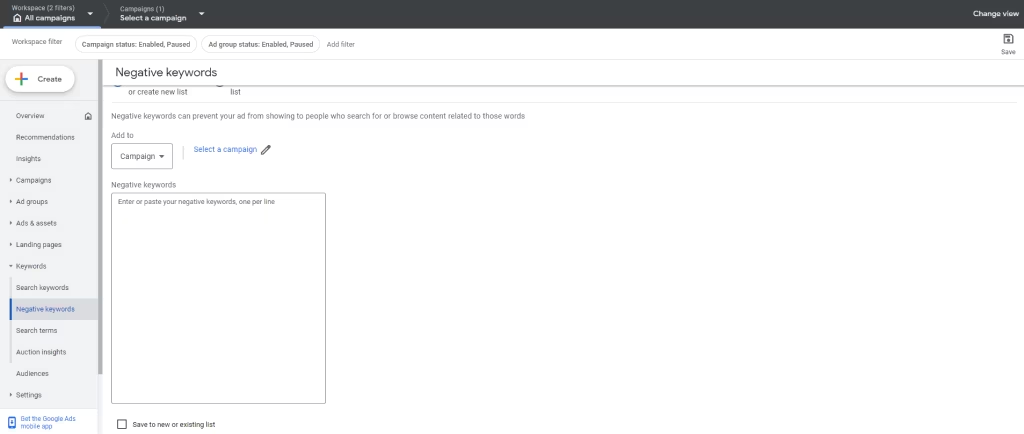
You can use negative keywords to limit who will see your ads. The right negative keywords ensure that your ads do not appear when specific keyword phrases are used. This setup can help you achieve the following:
- Boosting your click-through rate
- Increasing conversions
- Saving your advertising budget
- Increasing return on ad spend
- Attracting better leads
If you find that you are getting many clicks but few conversions, you might try adding some negative keywords to improve the relevance of your traffic.
— Ignoring Quality Scores
Google gives websites a quality score. This score is a ranking that indicates the quality and relevance of the site as it relates to lawyer PPC services and keywords. The quality score will determine your cost per click. It also impacts where ads are ranked in search and can impact which ads can be included in an ad auction.
The auction mechanism is a process Google uses to ensure that only relevant ads are shown to users. Lawyers who want their ads in the auction must pay a significant amount of money if their ads are not relevant.
— Landing Page Errors
Landing page performance is a key part of Google ad campaigns. If users encounter errors or other issues that impact their experience, bounce rates will increase while conversions decrease. If you aren't tracking your landing pages, you could be missing potential issues that are frustrating users and degrading performance.
The most common issues relating to landing pages are:
- Pages that are slow to load
- Expired or broken links
- Cluttered or confusing copy and visuals
Lack of mobile optimization
Many of these issues can be avoided with proper landing page design. This work includes thoroughly testing for the factors listed above. A law firm web design agency can ensure landing pages are rolled out correctly.
— Ignoring Ad Extensions
You can use ad extensions to make your search ads more noticeable to users. Extensions are additional information that you add to your copy to increase clicks and conversions.
Each time you create ad extensions for a campaign, they will appear on every ad within that campaign. For example, if a campaign has two ad groups with three and four ads, respectively, the extension will appear in all seven ads.
There are several ad extension types, including:
- Call Extension — adds your phone number to the ad
- Callout Extension — allows you to add several lines of text after your ad description
- Location Extension — adds a clickable link to an address in your ad that links to a map
- Sitelink Extension — includes additional links to your law firm's website in your ad
- Promotion Extension — adds a special promotion to your ad
- Message Extension — provides a link for prospective clients to text your business
Additionally, location extension will include your business hours if you have that information in your Google My Business profile. You can use the preview link to see exactly how your extensions will look. It's best to use extensions in a manner that makes it easier for clients to engage with your firm but doesn't distract them.
SEO vs Google Ads for Attorneys
Alright, quick reality check — both SEO and Google Ads can bring clients, but they work very differently!
Google Ads gives you instant visibility. You can show up on page one today and start getting leads within hours. However, it’s pay-to-play — once you stop spending, the traffic stops too.
SEO, on the other hand, is the long game. It takes months to build momentum, but once your pages rank, you keep attracting clients without paying for every click.
In short: Google Ads = fast wins. SEO = long-term growth. The smartest firms use both to balance speed and sustainability.
Google Ads for Lawyers: Cost vs. Worth
While Google Ads can be expensive, they offer a valuable opportunity for lawyers to reach potential clients who are actively searching for their services and can generate a high return on investment if executed properly. The decision of whether the cost is worth the investment largely depends on various factors, including the firm's budget, target audience, and marketing goals.
For law firms looking to get the best out of their Google Ads, it's important to implement the tips discussed in this guide. They can also work with an experienced lawyer marketing agency that can help navigate the complexities of the platform and create effective ad campaigns that reach the right audience. At Grow Law, we specialize in helping law firms achieve their marketing goals and increase their case flow through targeted Google Ads campaigns and other law firm SEO services.
FAQs
Got questions? We've got answers. Here's what law firms ask us most about running Google Ads.
-
Are Google Ads Really Effective for Attorneys?
Yes, Google Ads can be very effective for attorneys. Google Ads are a cost-effective way for attorneys to reach potential clients. They allow them to target specific keywords and phrases related to their legal services, as well as geographic locations. However, they can be competitive and the cost per click can be high, so it's important to have a well-planned and executed campaign strategy.
-
When Will You Notice the Results from Your Law Firm Google Ads Campaign?
The timeline for seeing results from a law firm's Google Ads campaign can vary depending on the competitiveness of keywords, the quality of ads and landing pages, and the size of the advertising budget. The results could be immediate if your campaign is good and may take a long time if it was done poorly.
It's important to have realistic expectations and a long-term approach to your Google Ads campaign. Additionally, it's important to continuously monitor and optimize your campaigns to ensure that you're getting the best possible results from your advertising spend. -
Can You Manage Your Google Ads Campaign on Your Own?
Yes, you can handle the campaign on your own but you need to put in the best practices. Managing a successful Google Ads campaign requires ongoing attention to detail, including keyword research, ad copywriting, landing page optimization, bid management, and performance monitoring. If you're not familiar with these aspects of Google Ads, it can be time-consuming and overwhelming to try to manage your campaign on your own. Therefore, it is also possible to work with a professional digital marketing agency like Grow Law to save you time and effort while you focus on legal tasks.
-
Should Your Law Firm Invest in Google Ads or SEO?
Ideally, both! Google Ads deliver quick visibility and immediate leads, while SEO builds authority and keeps clients coming in long after the ads stop. Most firms start with Ads to generate cases fast, then reinvest profits into SEO for stability. The combination gives you the best of both worlds — speed and sustainability.
-
How much do law firms typically spend on Google Ads?
Budgets vary by location and practice area, but most law firms spend between $5,000 and $15,000 per month on Google Ads. High-competition niches like personal injury or criminal defense can see CPCs between $50–$100+ per click. What matters more than spend is how much you get back in terms of qualified leads and signed clients.
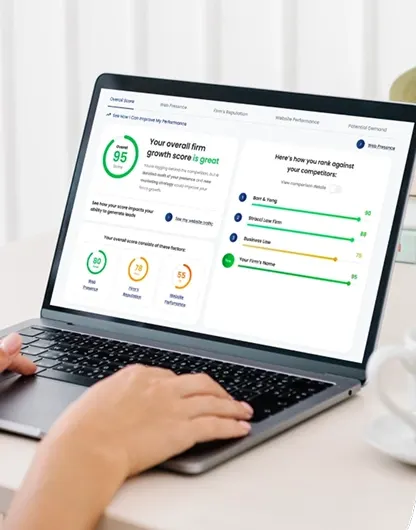
Compare Your Practice Instantly
Stay Ahead of the Competition!
Compare your law firm's performance to Local competitors with our instant assessment tool
Get a clear picture of your firm's performance
Boost your online presence
Compare My Firm
Compare Your Practice Instantly
Stay Ahead of the Competition!
Compare your law firm's performance to Local competitors with our instant assessment tool
Get a clear picture of your firm's performance
Boost your online presence
Compare My Firm
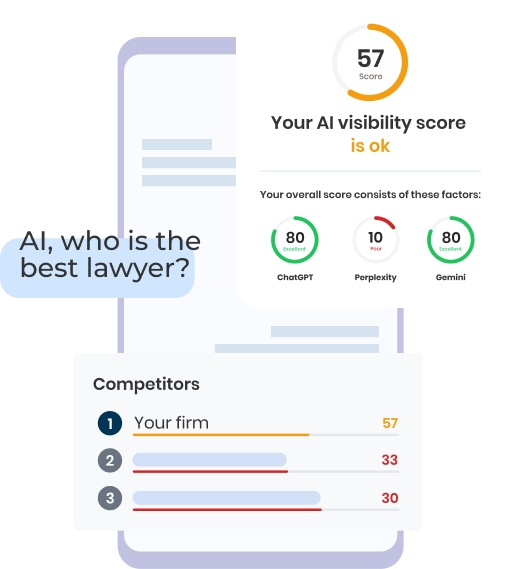
Check Your AI Visibility Instantly
Find Out What AI Is Telling Your Potential Clients
Run our free AI Visibility Report to:
See how often top AI tools mention your law firm
Spot which competitors show up first
Get the next steps to capture more cases
Run My Free AI Report